Best local LLM for your laptop: 8GB, 16GB or 32GB RAM
- Machine Learning
- Guides
- Local AI
- LLMs
- Hardware
- Written by
- Bhargav Tibadiya
- Published
- Reading time
- 16 min read
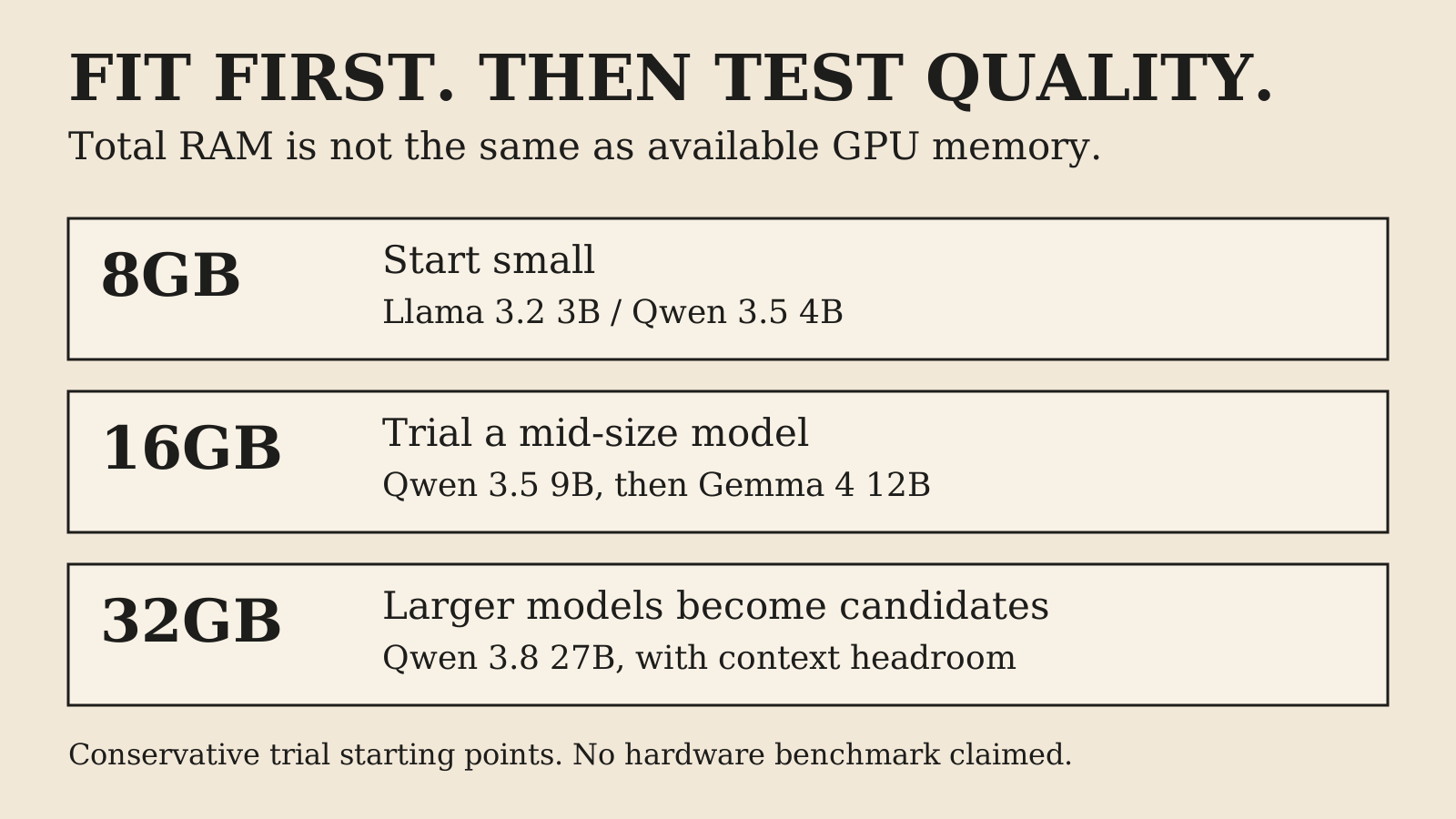
For an 8GB laptop, start with a small local model such as Llama 3.2 3B or a quantized Qwen 3.5 4B and keep the context modest. For 16GB, trial Qwen 3.5 9B before trying a larger option such as Gemma 4 12B. For 32GB, Qwen 3.8 27B becomes a candidate, but its roughly 18GB download still needs additional runtime and context memory. None of those RAM labels alone guarantees a fast or successful run.
The best local LLM is not automatically the newest or largest model. It is the model and runtime that fit the memory your machine can actually use while meeting your task's quality and speed needs. This guide uses documentation and model listings checked on November 5, 2026. It does not claim hands-on benchmarks on three laptops, and the hardware bands below are conservative starting points for testing rather than compatibility certifications.
Best local LLM: choose by available memory first
Start with the machine you own. Record total RAM, operating system, processor, GPU and dedicated VRAM if present. Then check memory use with your normal apps open. A laptop sold as 16GB does not offer all sixteen gigabytes to a model after the desktop, browser, editor and background services have taken their share.
On a machine with a discrete GPU, VRAM and system RAM are separate pools. A model that fits in system RAM may still be partly offloaded to the CPU because it does not fit in VRAM. On Apple Silicon, unified memory is shared by CPU and GPU, but the operating system and applications still use it too. Do not treat either architecture as unlimited memory. Ollama's scheduler, for example, measures a model's exact memory requirement before running it rather than estimating, which reduces out-of-memory crashes and improves GPU placement7.
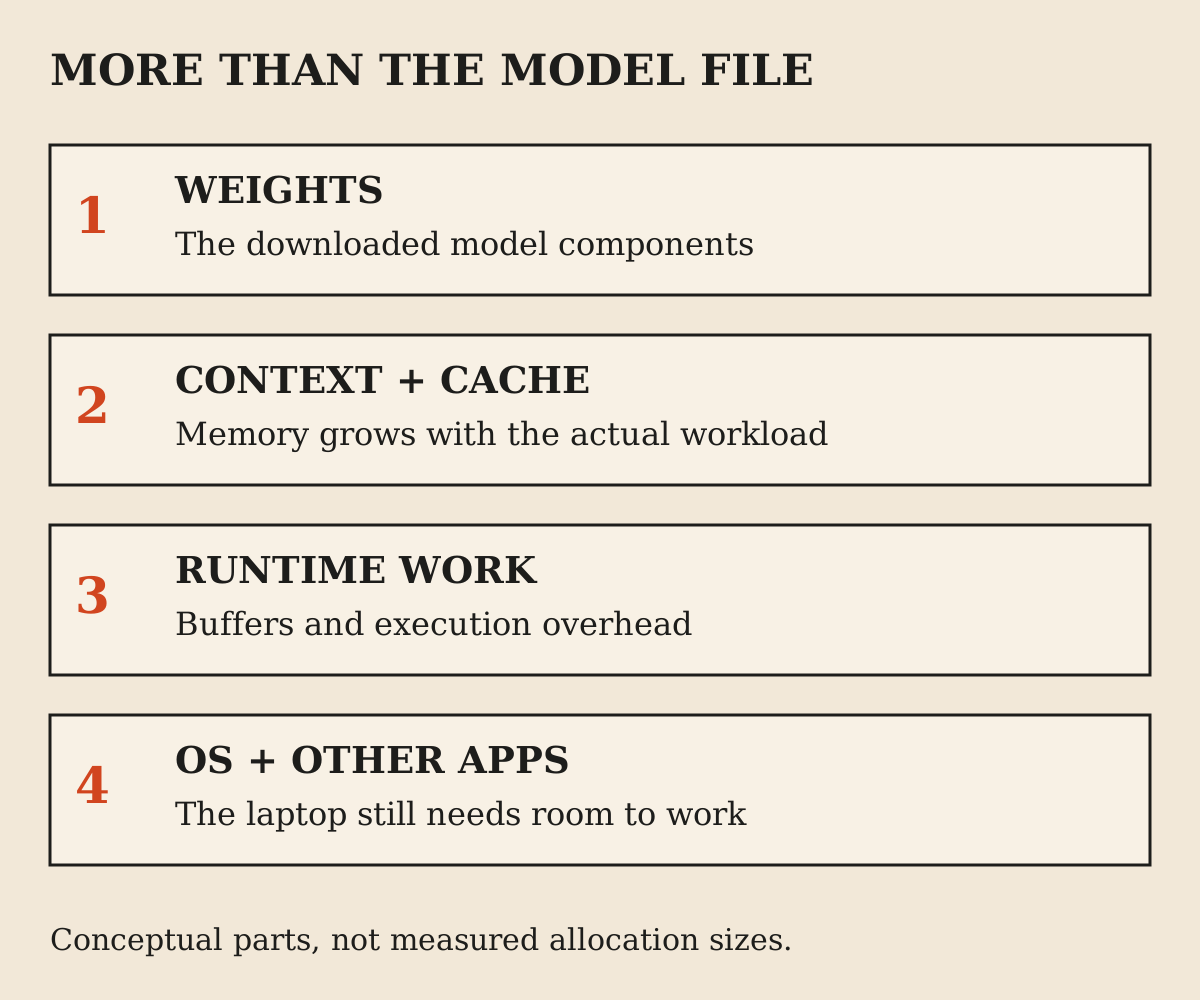
Use download size as an initial filter, not the final calculation. The runtime also needs space for context, intermediate work and other components. A multimodal package can include a vision projector in addition to the language weights. The number on the model page is useful evidence, but it is not a promise that a laptop with exactly that much RAM can run it comfortably.
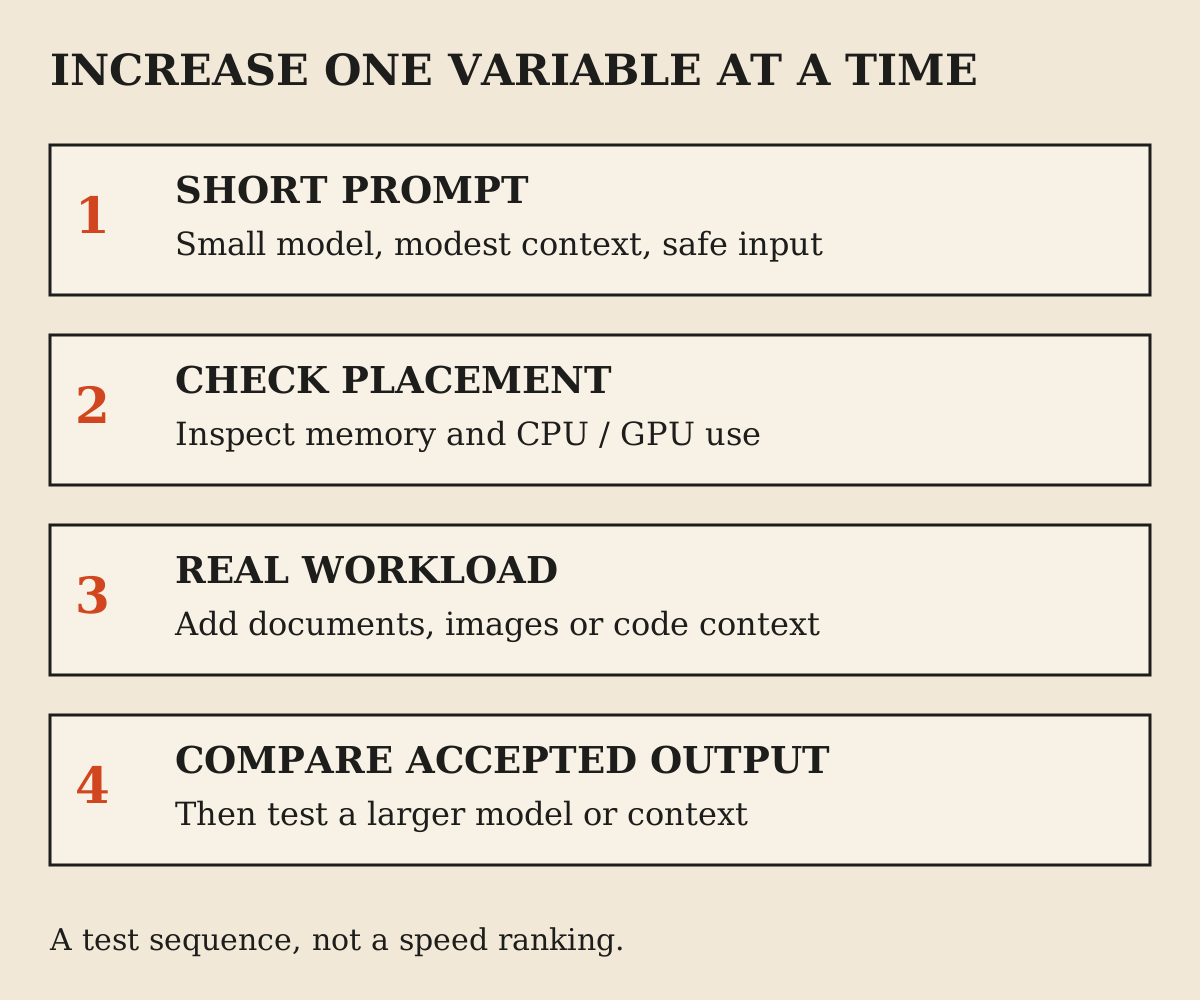
The practical rule is to leave room, start small and measure the real workload. You can increase model size after a successful baseline. Starting with the largest file that almost fits makes it harder to tell whether poor performance comes from the model, memory pressure, context or the runtime.
What the 8GB, 16GB and 32GB labels do not tell you
Two laptops with the same RAM can behave differently because their processors, memory bandwidth, cooling and GPU support differ. A thin fanless machine can run the same model as a desktop-class laptop while taking longer or slowing under sustained work. Capacity and speed are different questions.
Runtime support also matters. LM Studio recommends 16GB or more on Apple Silicon, with 8GB Macs steered to smaller models and modest contexts; its Windows guidance is at least 16GB RAM and 4GB dedicated VRAM, plus processor requirements8. Those are application recommendations, not a model-specific guarantee.
An older machine may have enough RAM but lack a supported instruction set or acceleration path. Before downloading a large model, check the runtime's current operating-system and hardware requirements. An installation failure is not evidence that local AI as a category is impossible on the machine, but it may mean a different runtime is needed.
Do not buy an upgrade from a model-size chart alone. First establish which task is slow or fails and whether the bottleneck is capacity, acceleration or output quality. More memory can make a larger model possible without making the smaller model faster. A new GPU can help only if the runtime actually uses it.
A cautious starting point for 8GB laptops
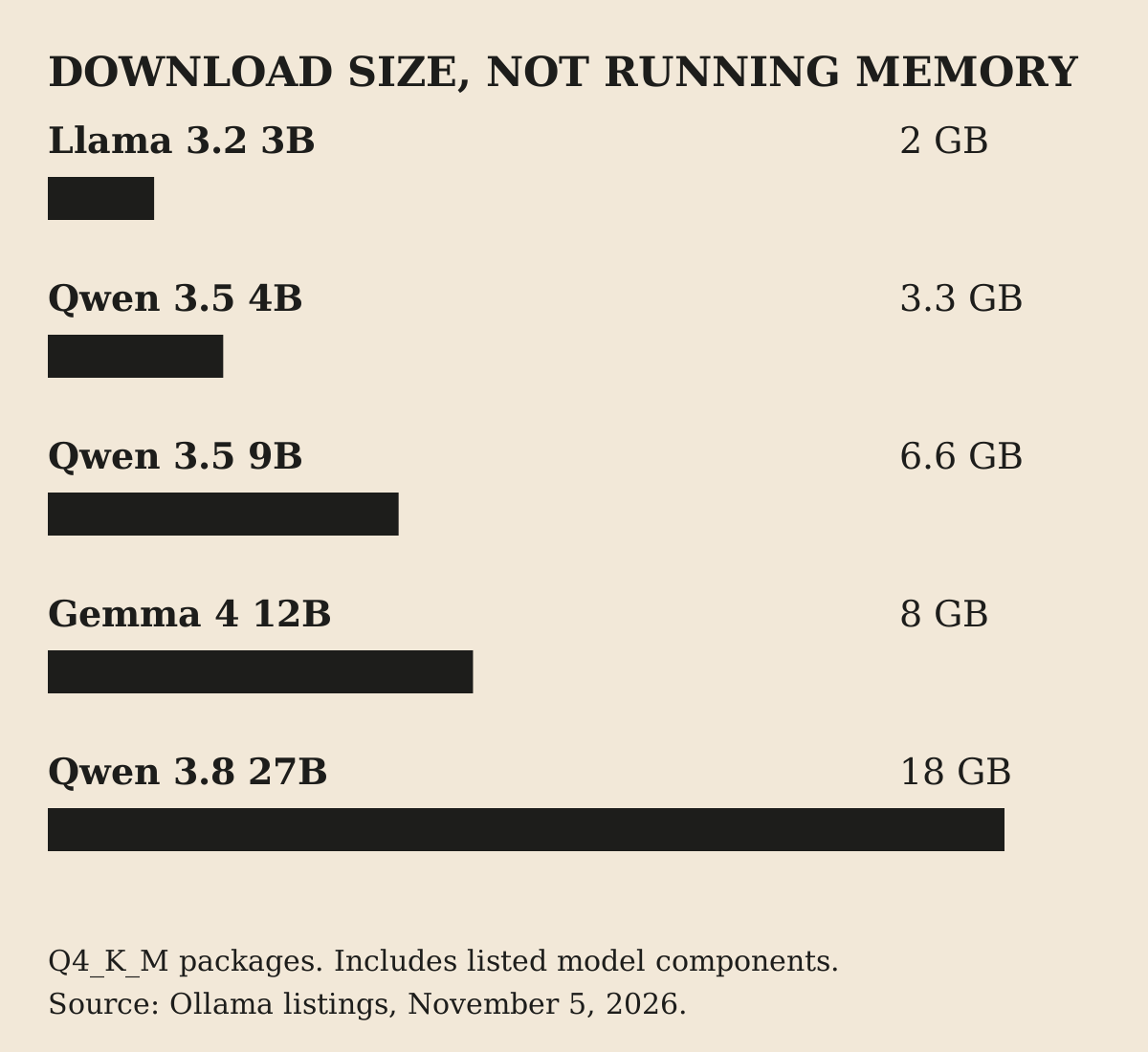
For 8GB total system RAM, use a small model and a short task. Llama 3.2 3B's Ollama listing is about 2.0GB at Q4_K_M1, and Qwen 3.5 4B's explicit Q4_K_M tag is about 3.3GB including listed components2. These are sensible trial candidates for basic drafting, extraction or simple questions, not claims of equal quality.
The larger of those two is not automatically the better experience. If your browser and editor already create memory pressure, the smaller file may finish a modest task more predictably. Close unnecessary applications, keep the first prompt short and inspect memory use rather than assuming an idle desktop represents your real working conditions.
Start without image input or a large document. That gives you a baseline for text inference. Add the feature you actually need afterward and watch whether memory or latency changes. A small language model that runs is not proof that its vision path or long-context configuration fits equally well.
One independent laptop guide uses broad 8GB wording in its opening recommendation but suggests 16GB for 7-9B models in its detailed memory guidance10. That disagreement is exactly why this guide does not promise that an 8B or 9B model is comfortable on every 8GB laptop. Treat broad RAM recommendations as leads to test, not hardware contracts.
A practical starting point for 16GB laptops
At 16GB total RAM, Qwen 3.5 9B is a useful first trial for general work; its explicit Q4_K_M tag is about 6.6GB3. That leaves more room than a model whose weights alone approach the entire system capacity, though the actual headroom still depends on your machine and apps.
Gemma 4 12B is another candidate to compare if you have enough free memory; its Q4_K_M tag is about 8.0GB4. Start with the smaller candidate first, then compare the larger one on the same task and context. The extra download and memory should earn their place through better accepted output, not a larger parameter number.
If you have 16GB system RAM but only 4GB or 6GB of discrete VRAM, do not read this as a full-GPU recommendation. The model may use CPU offload or another configuration. That can still be useful for occasional work, but the latency may not match videos made on a larger graphics card.
For coding, test the actual unit of work: a function explanation, a small patch or a repository question. A model that answers a short coding prompt well can struggle when the context includes several files. Fit the context and retrieval strategy to the task rather than pasting an entire repository because the advertised context limit is large.
What 32GB opens up, and what it still does not
A 32GB machine gives more room for larger weights and context, but it does not remove the need to budget both. Qwen 3.8 27B's Q4_K_M tag is about 18GB5. That makes it a plausible trial on a suitably supported 32GB setup, especially unified-memory hardware, but not a guaranteed comfortable configuration for every long task.
A Windows laptop with 32GB system RAM and 8GB VRAM is not equivalent to a 32GB unified-memory Mac for GPU placement. The language model can exceed the discrete GPU's capacity even though system RAM is available. Check where the runtime actually placed it and decide whether the resulting speed is acceptable.
Do not begin with the largest supported context. Try the real prompt at a modest setting, measure memory and then increase only as needed. A long context can consume the headroom that made the larger model seem to fit. Multiple simultaneous requests can create another source of pressure.
You may find that a smaller model is the better daily tool even when the larger one runs. If it is faster, leaves room for development tools and meets your acceptance checks, that is a legitimate win. Keep the larger model for tasks where its measured output improvement justifies the wait.
Quantization: smaller weights, another variable to test
Quantization stores model weights in a lower-precision representation. It reduces the size of the model package and can make a model practical on hardware that cannot hold a higher-precision version. Labels such as Q4_K_M identify a particular quantization, not a separate model family.
The tradeoff is not captured by saying four-bit is always good or always bad. Quality depends on the model, quantization method and task. A compact version can be useful for everyday work while failing a difficult extraction or reasoning case you care about. Compare it on your own acceptance checks.
Be precise about tags. A default model name can resolve to a package that changes or differs by runtime backend. The checked Qwen 3.5 4B page showed more than one backend package, with different sizes. This guide cites explicit Q4_K_M tags where possible so the size claim is recoverable.
Record the model tag and identifier when testing. If an update changes the artifact, re-run the important checks. A result measured on one package should not silently become a claim about every quantization and backend bearing the same family name.
Context length costs memory too
Context is the material the model can use during a request, including prompt content and conversation history within the runtime's limits. Longer is useful only when the task needs it and the system can afford it. A maximum advertised context is not a sensible default for every laptop.
Increasing context increases memory requirements, and Ollama's checked defaults vary by VRAM tier: 4K below 24GiB, 32K for 24-48GiB, and 256K at 48GiB or more6. Those are runtime defaults, not a statement that every model supports every setting or that system RAM equals VRAM.
The same documentation recommends at least 64,000 tokens for tasks such as agents and coding tools6. That is a workload recommendation, not a promise that your 8GB laptop can support it. If your use case needs large context, include that requirement in the hardware test instead of testing a short chat and declaring success.
For many document tasks, retrieval or smaller sections may be more practical than loading everything into one prompt. But retrieval introduces its own quality question: did it select the right passages? Reducing context does not remove the need to check whether the answer used the relevant evidence.
Why a model fits but runs slowly
The most common mistake is equating loading with useful performance. A runtime can place some work on the CPU, swap memory or take a long time to process a large prompt. The model may technically run while being too slow for your daily task.
Ollama's documentation recommends checking the PROCESSOR split with ollama ps. A full-GPU placement and a CPU/GPU split are different configurations. The command also reports context information, which helps explain why a short test and a longer session behave differently.
Separate prompt processing from output generation. Reading a long document can take substantial time before the first answer token appears. Then the model must generate the answer. A demo that shows only generation speed can hide the cost of preparing the input.
Use a realistic test duration. A laptop may behave differently after sustained work because of heat, power settings and competing applications. Do not turn a five-second impression into a tokens-per-second claim. This article provides no measured speed figures because no controlled hardware benchmark was run for it.
Ollama or LM Studio?
Choose the interface that fits how you work. Ollama offers a local model runtime with a command-line and API-oriented workflow. Its model pages show explicit run commands and tags. LM Studio offers a desktop interface for discovering, loading and chatting with models, plus local-server features.
For a developer integrating an application, the API path may matter most. For someone who wants to compare a few models and inspect settings without writing code, a desktop interface may be easier. Neither choice removes the need to check hardware support, model format and the exact package selected.
Downloaded models, document chat and local-server inference in LM Studio can work offline; model search, downloading models and runtimes, and update checks need connectivity9. Plan those downloads before travelling or testing without a network.
Avoid changing runtime and model simultaneously during troubleshooting. Establish a baseline with one supported model, then change one variable at a time. Otherwise you cannot tell whether a better result came from a new model, a different quantization, a context setting or a different acceleration backend.
A first-run procedure that avoids a giant download mistake
- Check the runtime's current requirements for your operating system and processor.
- Record total RAM, dedicated VRAM or unified memory, plus normal idle usage.
- Pick a small explicit model tag from a verified listing, not a cloud-only variant.
- Download the model and required runtime while connected.
- Start with a short, non-sensitive prompt and modest context.
- Inspect memory use, processor placement and time to a usable response.
- Add the actual document, coding context or image feature you need.
- Save the model identifier, settings and acceptance results before trying a larger candidate.
For example, the verified Ollama page supplies ollama run qwen3.5:4b-q4_K_M for the smaller Qwen candidate. The exact command is less important than preserving the tag and checking the result. Do not substitute a similarly named cloud model and assume the task remains local.
If the first run fails, read the actual error before increasing memory settings or downloading another large file. A missing runtime, unsupported GPU or invalid tag calls for a different fix from an out-of-memory error. Keep the error and configuration together so troubleshooting is reproducible.
Is local AI actually private and offline?
Local inference can keep prompts on your machine, but privacy is a property of the full workflow. The model runner, chat interface, extensions, web tools, connectors and storage all matter. A local model connected to a cloud search service is not an entirely offline system.
LM Studio's local model chat and document processing stay on the device9. That is a useful product claim within the documented scope. It does not establish what every third-party extension or connected application does with the output. Read the policy for the components you actually enable.
Test the offline path with a downloaded model and a non-sensitive prompt while disconnected. Confirm that the required task still works, not merely that the app window opens. Keep in mind that model downloads, catalog search and updates need connectivity even when inference does not.
Also consider local storage. Conversation history, document copies and generated files can remain on the machine. Disk encryption, backups, user accounts and device access still matter. Keeping data off a provider's server does not make it safe from someone who can read your laptop.
The Cursor Privacy Mode guide explains the opposite side of this distinction: a cloud tool can restrict training without keeping processing local. Neither local nor cloud should be treated as a magic privacy label.
What should you test before choosing a daily model?
Use a small set of representative tasks. For writing, check whether it preserves supplied facts and follows revisions. For extraction, include missing fields and ambiguous dates. For coding, run tests against a bounded change. For document questions, check that the answer cites or identifies the relevant passage.
Measure accepted output, not only fluency. A small model can produce a confident answer that is wrong, and a larger model can do the same with more detail. If you need manual verification anyway, include that time in the comparison.
Keep the prompt and settings consistent across candidates. Record context length, quantization, runtime version and whether acceleration was used. A comparison between a short-context GPU run and a long-context CPU-offloaded run is not a clean model-quality test.
Set a stopping rule. If no local candidate meets the quality requirement at acceptable latency, consider a hybrid workflow or a different task boundary. You do not need to force local inference onto work where the machine cannot provide the required result.
Coding, structured output and tools need extra checks
A local model that chats well may not reliably produce valid tool arguments or structured data. Validate schemas and reject missing or unexpected fields. Do not let a parser's success stand in for semantic correctness; a valid amount can still be the wrong amount.
For coding, distinguish a helpful explanation from a safe repository change. Review the diff, run the build and tests, and check for unrelated edits. A local runtime changes where inference happens, not whether generated code can introduce a security or correctness problem.
For tool-using applications, permissions should remain outside the model's discretion. Limit accessible files and commands, require approvals where appropriate and verify the final external state. A small on-device model should not gain unrestricted shell or email access merely because it avoids a cloud provider.
The AI coding agent comparison is a useful companion when the task involves an editor or terminal. Model fit is only one component of a useful coding system. The interface, test loop and permission design can matter just as much.
Licensing and download trust still matter
Open weights and open source are not interchangeable guarantees about every artifact. Inspect the license attached to the exact model and any relevant components before commercial use. The runtime's license is separate from the model's license.
Prefer official or clearly identified model sources. A familiar family name in a community upload does not establish who produced the quantization or whether the artifact matches the expected model. Record the source and identifier so you can recover what was installed.
Do not repeat a family-wide benchmark as proof of a small quantized variant's performance. The Qwen listing includes benchmarks for a much larger family member; those numbers do not become measurements of the 4B file in this guide. This is a common way a plausible model recommendation becomes misleading.
Keep the same discipline for safety claims. A local model can still produce harmful instructions, false facts or insecure code. Offline execution changes the data path. It does not certify the output.
A realistic upgrade path
Begin with the smallest candidate that might meet the task. If quality is insufficient but the machine has room, compare the next size using the same test. If speed is insufficient, inspect placement and memory pressure before assuming a larger model will help.
If you need long documents, test that workload before buying hardware. Context requirements can dominate the difference between a comfortable short chat and a failing session. If you need vision, include the actual image sizes and number of images in the evaluation.
Buy memory or hardware only after identifying a repeatable bottleneck. A cloud subscription, an API used selectively or a smaller local workflow may be cheaper than upgrading a laptop for a task you perform occasionally. Conversely, frequent offline work or strict data boundaries can make local capability valuable even when it is slower.
The right endpoint is a repeatable setup you understand: a named model artifact, supported runtime, measured task performance and clear privacy boundaries. That is more useful than a list claiming one model is best for every machine with the same RAM sticker.
FAQ
Can I run a local LLM on 8GB RAM?
Often a small model is possible, but the runtime, operating system and free memory matter. Start with a small quantized candidate and modest context. LM Studio recommends 16GB or more and qualifies 8GB Mac use to smaller models and contexts.
What is a good first model for 16GB RAM?
Qwen 3.5 9B Q4_K_M is a trial candidate at about 6.6GB download size in the checked listing. It is not a guarantee of full-GPU placement or speed on every 16GB laptop. Measure the real workload.
Can a 32GB laptop run Qwen 3.8 27B?
Its checked Q4_K_M package is about 18GB, making it a candidate on suitably supported hardware. Context, runtime overhead, other apps and the distinction between RAM and VRAM still determine practical fit.
Is download size the same as required memory?
No. Running memory also includes context and runtime work, and the operating system needs its own capacity. Use the listing as an initial filter, then inspect actual memory use.
Does a bigger model always give a better result?
No. Task quality, quantization, context handling and acceptable latency all matter. A smaller model that meets the acceptance checks can be a better daily tool.
Why is my model using the CPU?
The runtime may not support or detect the GPU, or the model may not fit fully in its memory. Inspect the actual processor placement and error information rather than assuming total system RAM establishes GPU fit.
Can local AI work without internet?
Downloaded models can support offline inference in documented runtimes such as LM Studio. Model search, downloads, updates and connected web tools can still require a network. Test the actual task while disconnected.
Does local mean no privacy risk?
No. It can reduce cloud disclosure, but local history, files, backups, extensions and connected services remain relevant. Review the whole workflow and protect the device.
Are the listed sizes speed benchmarks?
No. They are checked package sizes. This article has not measured tokens per second or task quality on a hardware test bench.
Sources
- Ollama: Llama 3.2 3B (opens in a new tab)
- Ollama: Qwen 3.5 4B Q4_K_M (opens in a new tab)
- Ollama: Qwen 3.5 9B Q4_K_M (opens in a new tab)
- Ollama: Gemma 4 12B Q4_K_M (opens in a new tab)
- Ollama: Qwen 3.8 27B Q4_K_M (opens in a new tab)
- Ollama: Context length (opens in a new tab)
- Ollama: New model scheduling (opens in a new tab)
- LM Studio: System requirements (opens in a new tab)
- LM Studio: Offline operation (opens in a new tab)
- DigitalGeekSpot: laptop model guide, with qualified RAM recommendations (opens in a new tab)