LLM cost optimization: 9 techniques to cut API bills (2026)
- AI Application Development
- Guides
- LLM costs
- AI APIs
- Prompt caching
- Written by
- Bhargav Tibadiya
- Published
- Reading time
- 13 min read
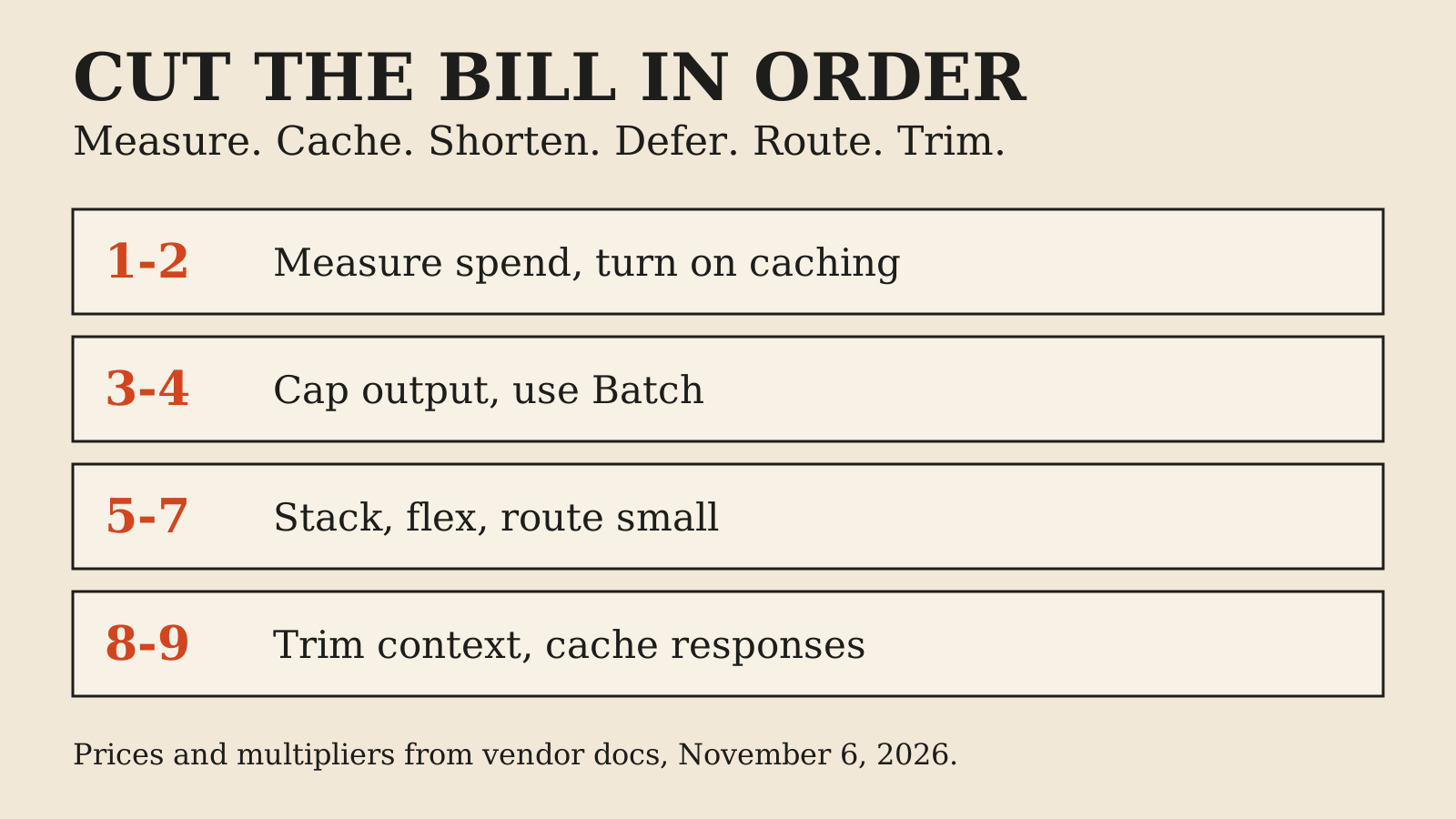
The fastest way to cut an LLM API bill is to stop paying full price for the same input twice. Prompt caching does that, and for most production apps it is the largest single saving. After caching, the order that usually pays is: send less output, move waiting work to Batch, and send easy requests to a smaller model.
This guide ranks nine techniques by how much money they can plausibly move, shows current price multipliers from the vendor docs, and runs one worked example so you can see the numbers stack. For raw per-token prices across vendors, see the cheapest AI APIs comparison. This article is about what you do once you have picked a model.
Where the money actually goes
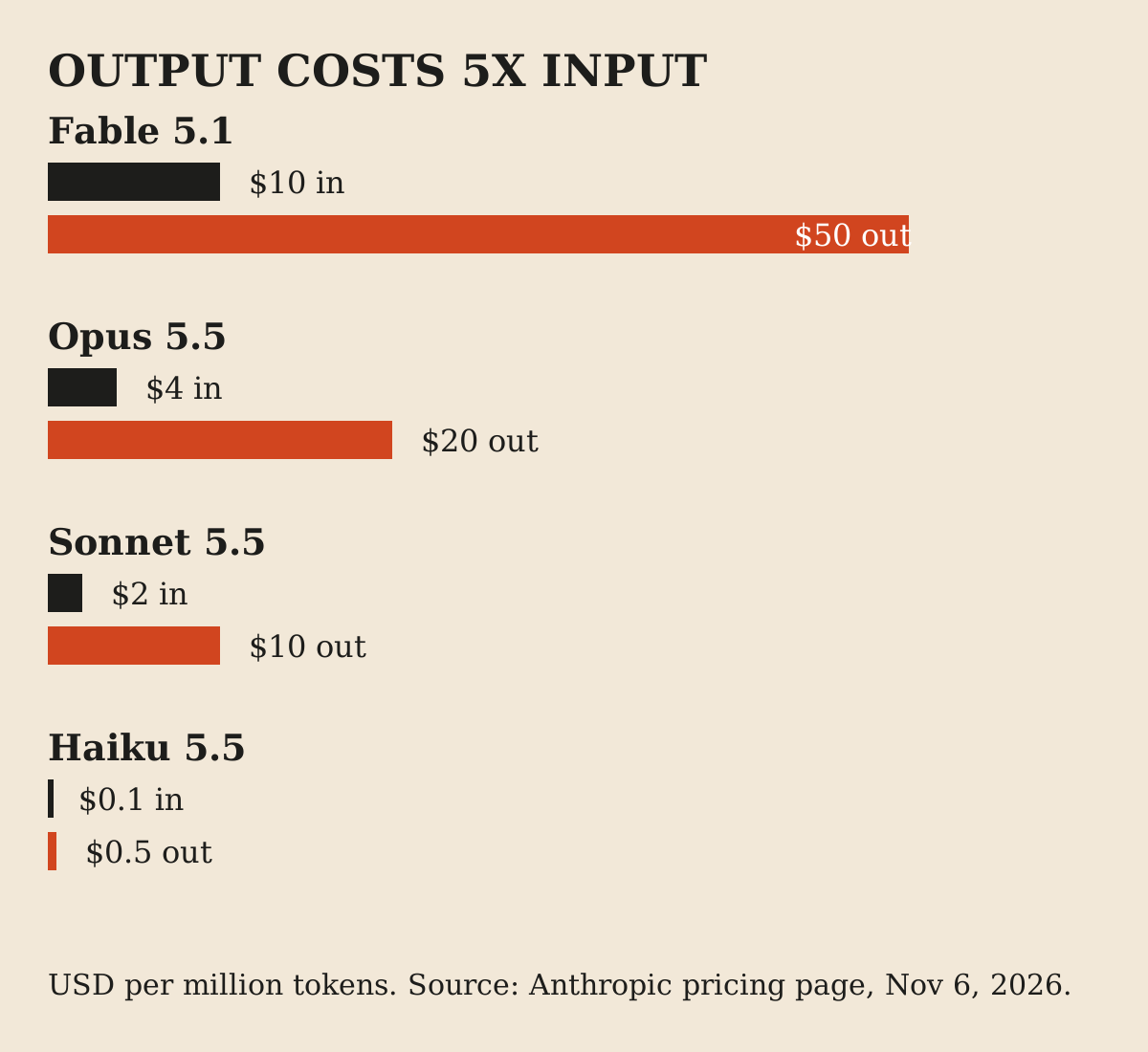
Every request has three cost lines: input tokens, output tokens, and any extras such as cache writes or premium modes. Output is the expensive one. On the current Claude 5.5 line, Sonnet 5.5 lists at $2 per million input tokens and $10 per million output tokens, and Haiku 5.5 at $0.10 and $0.50[1]. That is five times as much for each output token.
So a request with 6,000 input tokens and 500 output tokens spends $0.012 on input and $0.005 on output. Input still dominates by volume, which is why caching matters. But each output token is five times as costly, which is why shorter answers matter too.
The worked example used in this guide
Numbers are easier to trust when you can redo them. Every dollar figure below uses one made-up workload. It is illustrative, not a benchmark and not a measurement of any real product.
The workload: 1,000,000 requests a month on Sonnet 5.5. Each request carries a fixed 5,000-token prefix (system prompt, tool definitions, policy text), 1,000 tokens that change per request, and returns 500 tokens. List prices from the Anthropic pricing page: $2 input, $10 output per million tokens[1].
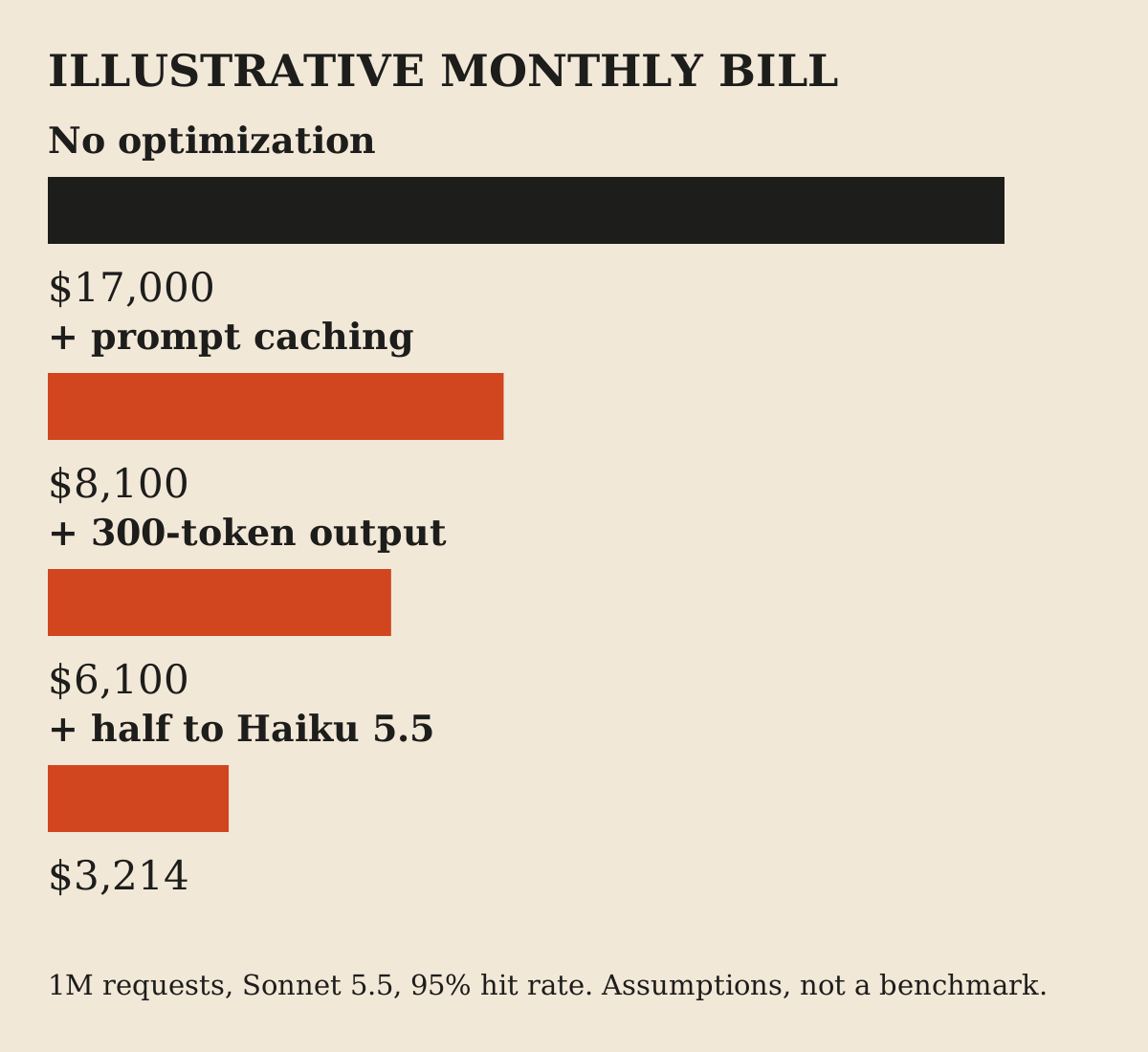
Baseline with no optimization: 6,000 input tokens cost $12,000 across the month, 500 output tokens cost $5,000. Total $17,000.
Keep that number. The techniques below move it.
1. Measure before you change anything
You cannot rank techniques without knowing your own split. Three free or cheap tools cover it.
Every Claude response reports its own token usage, including cache reads and cache writes. The token counting endpoint is free to use, subject to rate limits, and lets you size a prompt before sending it, which is useful for cost estimates and routing decisions[4]. For organization-level reporting, the Usage and Cost Admin API breaks spend down by model, workspace and API key, but it needs an organization account and an Admin API key, so individual accounts cannot use it[5].
Tag each request with the feature that triggered it. A spend report that says "Sonnet, $9,000" is not actionable. "Support summaries, $6,400, 80% of it a repeated 5,000-token prefix" is.
What to look for: the share of input that repeats across requests, the ratio of output to input, and which features use the most expensive model for the easiest work.
2. Turn on prompt caching
Prompt caching stores the processed form of a repeated prompt prefix so later requests read it instead of paying full input price.
On Anthropic, a cache write costs 1.25 times base input for the 5-minute lifetime or 2 times for the 1-hour lifetime. A cache read costs 0.1 times base input, and 0.05 times on Opus 5.5 and Sonnet 5.5. Anthropic notes that caching pays off after one read for the 5-minute duration and after two reads for the 1-hour duration[2]. Automatic caching can be enabled with a top-level `cache_control` setting.
OpenAI documents the same idea. Cached input is discounted by up to 95%. For GPT-5.6 and later, the minimum prefix is 1,024 tokens, writes cost 1.25 times at the default 30-minute lifetime, and reads cost 0.1 times on most models and 0.05 times on GPT-6.1 Sol and Terra. OpenAI's own example: ten requests with one write and nine reads cost 2.15 times what one uncached request costs, against 10 times for ten uncached requests[6].
Three gotchas. First, there is a minimum prompt length. On Claude it is 512 tokens for the 5.5 models and Fable and Mythos 5.x, 1,024 for Opus 4.8 and Sonnet 5 and 4.6, and 4,096 for Haiku 4.5. Shorter prompts are processed without caching and no error is returned[2]. Second, changing tool definitions or any content earlier in the prefix invalidates the cache from that point on[2]. Put stable content first and per-request content last. Third, check the response usage fields: if cache reads are zero, caching is not working, whatever your code says.
Worked example: with a 95% hit rate on the 5,000-token prefix, input cost falls from $12,000 to $3,100. Total bill: $8,100, down 52%. The hit rate is an assumption; yours depends on traffic spacing and how often the prefix changes.
3. Cap and shape output tokens
Output is five times the price of input on these models[1], so every unnecessary sentence is expensive.
Set a `max_tokens` limit that fits the task. Ask for a format that is short by design: a JSON object with fixed fields, a label plus one sentence, or a numbered list with a word limit. Remove instructions that invite padding, such as "explain your reasoning in detail" on tasks where nobody reads the reasoning. This is general practice rather than a vendor-documented saving, so test the effect on your own outputs.
Worked example: cut average output from 500 to 300 tokens. Output cost falls from $5,000 to $3,000. With caching, the bill goes from $8,100 to $6,100. Total saving so far: 64%.
Watch quality. A hard length cap can cut an answer off mid-sentence. Prefer asking for brevity in the prompt and using the cap as a safety net.
4. Use the Batch API for work that can wait
If a task does not need an answer right now, it should not pay for an instant one. Nightly summaries, bulk classification, backfills, evaluation runs all qualify.
Anthropic's Message Batches API takes 50% off input and output[1]. A batch can hold up to 100,000 requests or 256 MB, most batches finish within an hour, and the maximum is 24 hours[3]. OpenAI's Batch API also gives 50% lower cost, a separate and higher rate-limit pool, a 24-hour completion window, and limits of 50,000 requests and 200 MB per batch[7].
The trade is latency and shape. You submit a file, poll or wait, and collect results. That suits pipelines and does not suit a chat window.
Worked example, applied to a different job: if the same 1M requests were an overnight job instead of a live feature, the uncached baseline would drop from $17,000 to $8,500 on Batch alone. Our live-feature example does not use it, which is the point: Batch only helps the share of your traffic that can wait. Audit your traffic for that share before assuming it is zero.
5. Stack Batch with caching
The discounts multiply. Anthropic states that caching multipliers stack with other pricing modifiers including the Batch discount[2], and the batch documentation says the two savings combine[3].
There is one catch. Batch requests run concurrently and asynchronously, so cache hits are best-effort. Anthropic reports typical hit rates between 30% and 98% depending on traffic[3]. Keep the shared prefix identical across the batch, and consider the 1-hour cache lifetime for large batches so the cache does not expire mid-run.
Worked example: apply Batch to the cached, shorter-output $6,100 workload and it becomes $3,050 if every request can wait and hit rates hold. That is a best case. The real number is a range, and the low end of the hit-rate range gives a higher bill.
6. Try flex processing where it is offered
OpenAI offers a `service_tier: flex` option. It is priced at Batch rates, plus caching discounts, but you call it like a normal synchronous request. The documentation labels it beta, limited to certain models, slower than standard, and subject to occasional resource unavailability[8].
That makes it a fit for background jobs where you want Batch pricing without building file-based plumbing, and where a retry or a delayed answer is acceptable. It is a poor fit for anything a user is waiting on. Build in retries with backoff and a fallback to the standard tier if the job is time-sensitive. Check the current model list before relying on it, since support is limited.
7. Route easy requests to a smaller model
The cheapest tokens are the ones billed at a small-model rate. On the Claude 5.5 line, Haiku 5.5 is $0.10 input and $0.50 output, against $2 and $10 for Sonnet 5.5, a 20 times gap[1]. Prompts over 100,000 tokens on Haiku 5.5 are priced at $0.50 and $2.50[1], so the gap narrows for very long inputs.
Routing means classifying each request and sending it to the cheapest model that handles it well. Extraction, tagging, short rewrites, simple support replies and format conversion often fit a small model. Multi-step reasoning, hard code changes and high-stakes decisions often do not. A simple router can be rules (task type, input length) or a cheap model that labels difficulty. Use the token counting endpoint to route by length[4].
Worked example: route half of the traffic to Haiku 5.5, keep the other half on Sonnet 5.5, both with caching and 300-token outputs. The Sonnet half costs about $3,050. The Haiku half costs about $164. Total: about $3,214, down 81% from $17,000.
That figure assumes half the traffic is easy enough for the small model at acceptable quality. That assumption carries the whole saving. Test it on a sample of real requests with a pass or fail check before you route live traffic. If only 20% of traffic qualifies, the saving is much smaller.
For the model price table itself, use the pricing comparison and recheck it, since list prices change.
8. Trim context before it grows
In chat and agent loops, input grows every turn because the whole history is resent. Late turns cost more than early ones because they carry everything before them.
Anthropic's context editing can clear old tool results and thinking blocks automatically, and the documentation names server-side compaction as the primary strategy for managing long conversations[9]. Outside vendor features, the general approach is to summarize older turns, drop tool output you no longer need, and retrieve only the relevant passages instead of pasting whole documents.
Trimming trades cost for memory. Whatever you remove, the model can no longer use. Compaction also edits the prefix, which can interact with caching, so check cache reads after you turn it on.
9. Cache whole responses for repeated questions
Prompt caching saves on input. Response caching skips the model call entirely when the same question comes in again.
LiteLLM, an open source gateway, supports in-memory, Redis, S3, GCS and disk caches, plus semantic caching with Redis or Qdrant, which matches questions that are similar rather than identical[10]. An exact-match cache is safe and simple. A semantic cache saves more but can return an answer written for a slightly different question.
Use it for high-repeat, low-risk traffic: FAQs, public documentation questions, deterministic transformations. Avoid it where answers depend on user data, time or permissions, unless the cache key includes all of them. A wrong cached answer is served many times, so set expiry and log hits.
Costs that eat the savings
A few line items can quietly undo the work.
Data residency. Setting `inference_geo: us` on Anthropic is priced at 1.1 times, and the multiplier stacks with others[1]. Fine if you need it, expensive if you set it by default.
Fast mode. Anthropic's fast mode carries a premium on supported Opus models and is not available with Batch[1]. Use it for the few calls where speed is worth money.
Cache write surcharge. A write costs 1.25 times or more. Caching a prefix that is read once, or one that changes on every call, costs more than not caching. Use the usage fields to confirm reads outnumber writes.
Long context pricing. Check the tiers for the model you use, such as the different Haiku 5.5 rate over 100,000 tokens[1].
Retries and agents. A loop that retries a failing call or lets an agent run unbounded steps multiplies every cost above. Set step limits and budget alerts.
A sensible order to apply them
Do these in this order, and measure after each.
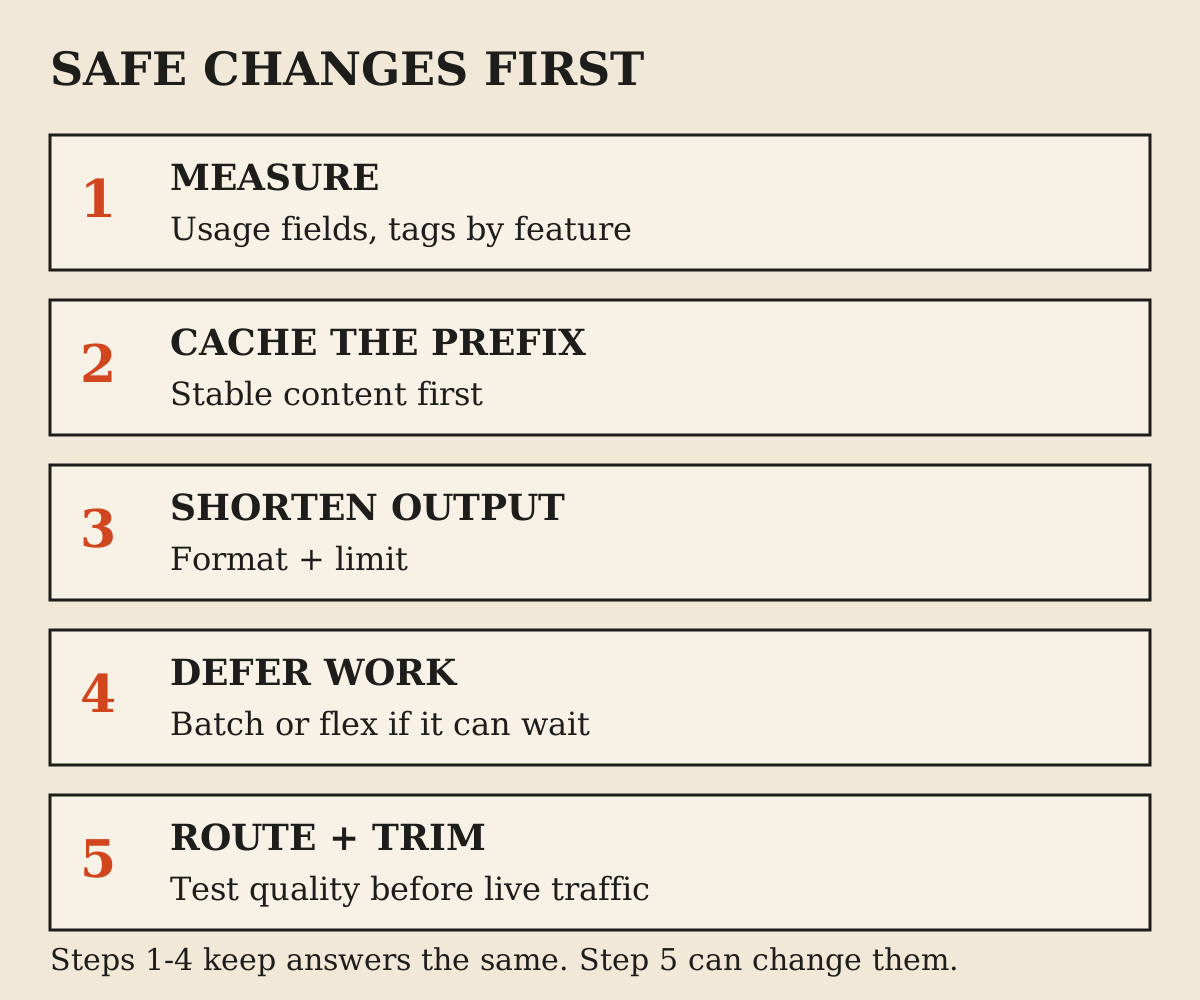
First, measure so you know your split. Second, enable prompt caching and fix any prefix instability. Third, shorten outputs. Fourth, move anything that can wait to Batch or flex. Fifth, route easy work to a small model, with a quality check. Sixth, trim context in long conversations. Seventh, add response caching for repeat questions.
The order follows risk as much as reward. The first four change cost without changing answers. Routing and trimming can change answers, so they need testing. This is a suggested sequence from the mechanics above, not a result measured on a specific product.
What this looks like for a small team
For one developer or a small team, the first three are an afternoon each: read the usage fields, add `cache_control` to the stable prefix, and cap output. They need no new infrastructure. Batch needs a small job runner. Routing needs a test set and some discipline.
If your bill is small, stop early. A $200 monthly bill that drops to $120 after caching alone may not justify building a router. If your bill is five figures, the whole list is worth a sprint.
FAQ
What is the fastest way to reduce LLM API costs?
Turn on prompt caching for any large prompt prefix that repeats across requests. Cache reads cost a fraction of base input, and it does not change the model or the answers.
How much can prompt caching save?
Vendors publish read prices of 10% of base input, or 5% on some models, with a write surcharge of 1.25 times or more. Your saving depends on how much of your input repeats and how often it is read before it expires. In the worked example it cut the bill by about half.
Is the Batch API worth it?
Yes, for work that can wait. Both Anthropic and OpenAI list 50% off with a 24-hour window. It does not suit interactive features.
Do output tokens really cost more than input tokens?
On the Claude 5.5 line, yes: five times as much per token. Check your own model's price page, since the ratio differs between vendors and models.
Should I switch to a cheaper model?
Only for the requests where it passes your own quality check. Route by task difficulty instead of switching everything.
What is flex processing?
An OpenAI service tier priced at Batch rates that runs through the normal request path. It is slower, in beta, limited to certain models, and can be unavailable at times.
Can I stack caching and batch discounts?
Yes. Both vendors document that the discounts combine. On Anthropic, cache hits inside batches are best-effort.
Does semantic caching risk wrong answers?
It can. It returns the stored answer for a similar question, which may not fit the new one. Use it for low-risk repeat traffic and keep exact-match caching for anything sensitive.
How do I know which feature is costing the most?
Tag requests by feature and read the usage fields on each response. On Anthropic organization accounts, the Usage and Cost API reports by model, workspace and API key.
Are the dollar figures in this guide real savings?
The prices and multipliers come from vendor documentation checked on November 6, 2026. The $17,000 to $3,200 example is an illustration with stated assumptions, not a measured result.
Sources
- Pricing - Claude API Docs (opens in a new tab)
- Prompt caching - Claude API Docs (opens in a new tab)
- Message Batches API - Claude API Docs (opens in a new tab)
- Token counting - Claude API Docs (opens in a new tab)
- Usage and Cost API - Claude API Docs (opens in a new tab)
- Prompt caching - OpenAI API (opens in a new tab)
- Batch API - OpenAI API (opens in a new tab)
- Flex processing - OpenAI API (opens in a new tab)
- Context editing - Claude API Docs (opens in a new tab)
- Caching - LiteLLM (opens in a new tab)
Elsewhere on this site
The cheapest AI APIs comparison lists per-token prices across vendors. The selected work catalogue covers the products behind these engineering notes.