MCP vs API: the difference, with a real integration example
- AI Application Development
- Guides
- MCP
- API
- AI agents
- Written by
- Bhargav Tibadiya
- Published
- Reading time
- 15 min read
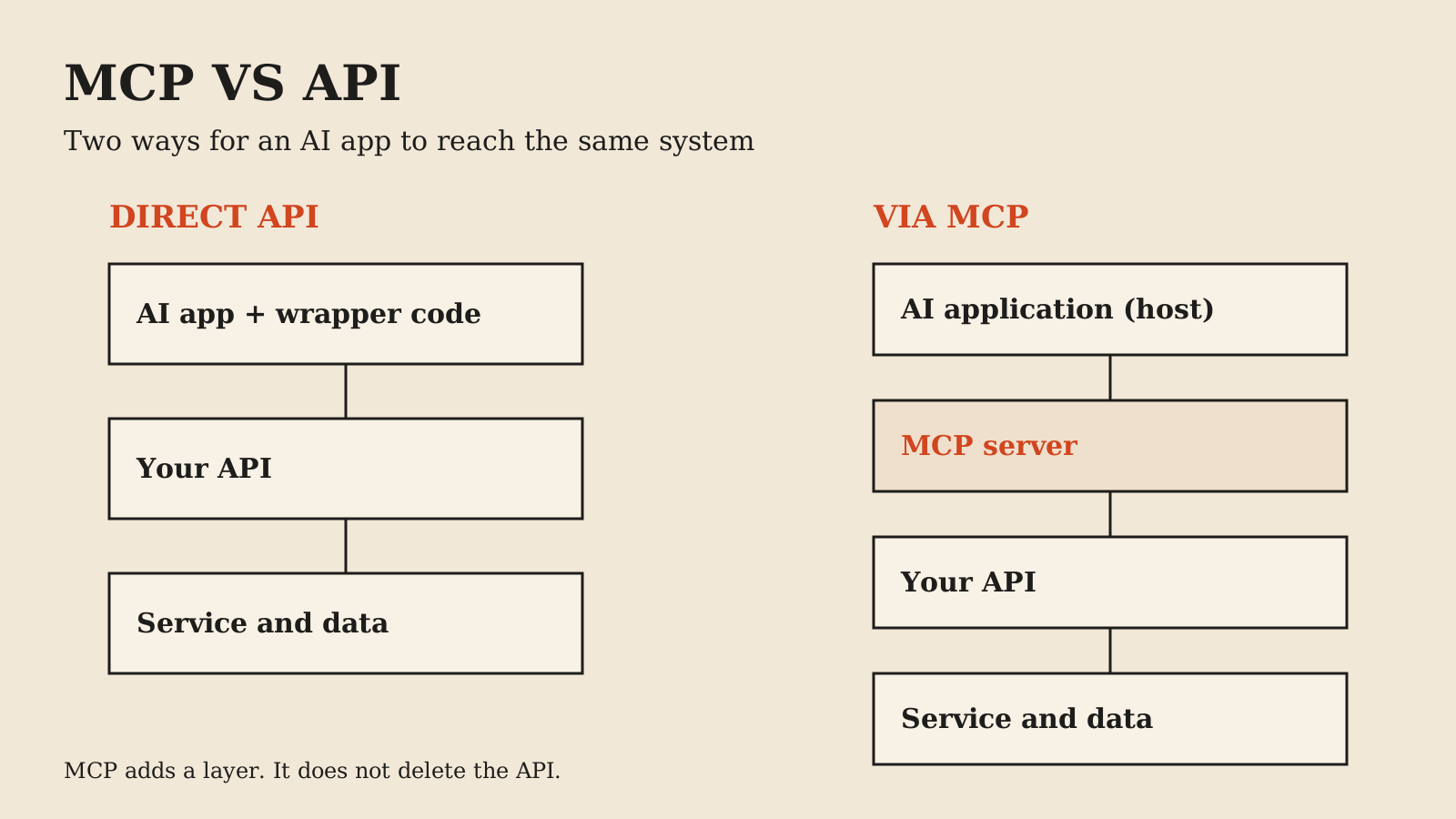
MCP does not replace your API. An API is an interface that code calls; MCP is an open standard that lets an AI application discover what an external system can do and invoke it while a model is deciding the next step[1]. In many deployments an MCP server sits in front of an existing API, translating model-led requests into ordinary API calls underneath. The real choice is not MCP or API but which consumer you are serving: code you write once, or a model that chooses actions at runtime.
This guide explains the difference with one worked integration, using the MCP specification, the OWASP MCP security guidance and vendor material checked on November 5, 2026. The example is an illustrative design, not a measured deployment. Vendor sources that advocate MCP are labeled as such, and integration convenience is never a security guarantee.
MCP vs API: the short answer
An API is a contract written for a developer. Its endpoints, parameters and response shapes assume a person read the documentation and wrote code against it. That code decides when to call, with what arguments, and what to do with the result.
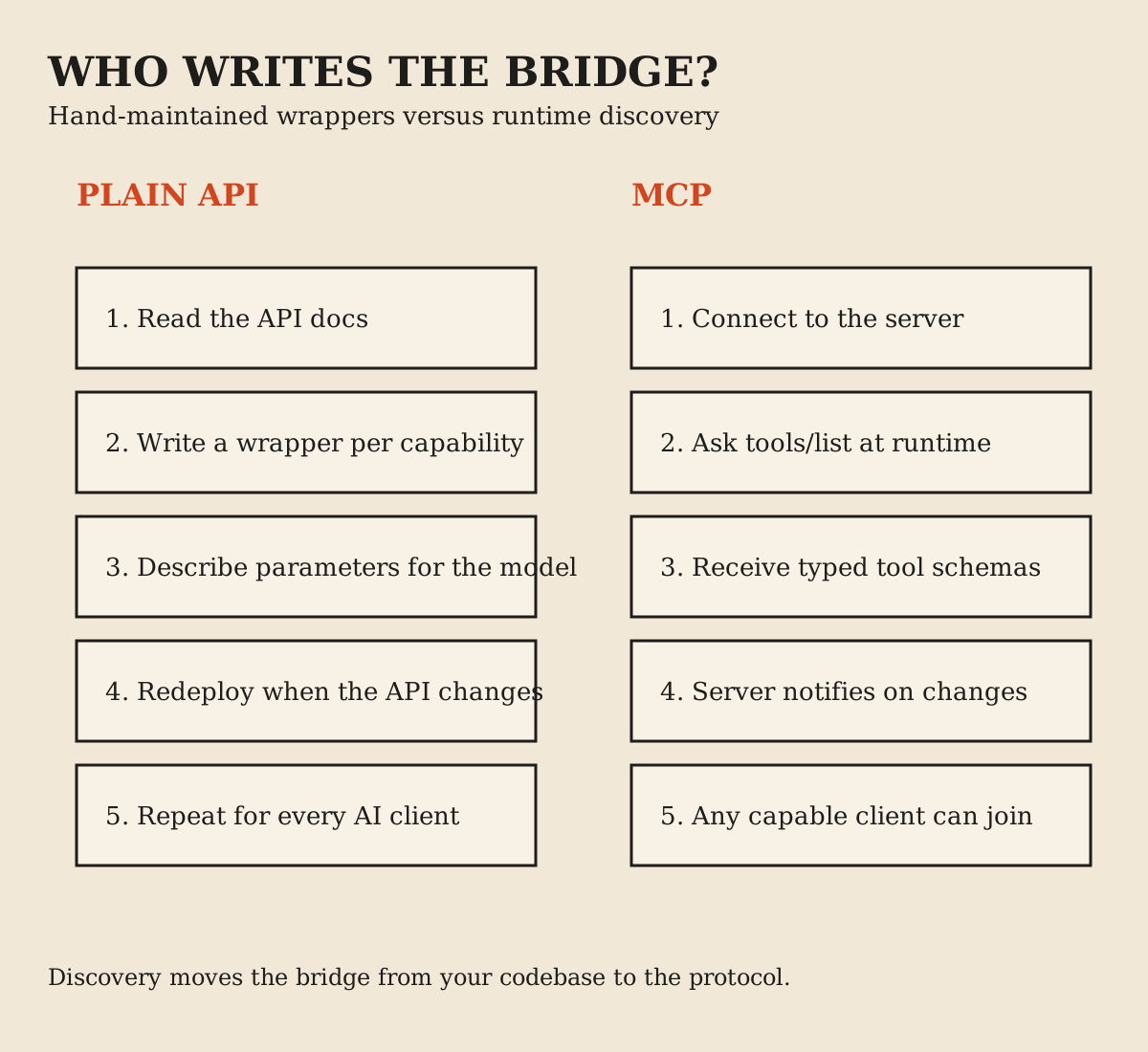
MCP is a protocol written for a model's runtime. An AI application connects to an MCP server and can ask it what it can do, receive structured tool descriptions, and call those tools with typed inputs while the model works through a task[1][3]. The descriptions and schemas travel with the server, so the application does not need a hand-written wrapper per endpoint.
Both can coexist in the same system, and often should. Your API remains the system of record for your service's operations. MCP is one way to expose selected capabilities from it to AI applications. A useful mental test: if you deleted every AI client tomorrow, the API should still carry the whole product. An MCP server can also front files, databases or other tools, so it does not always sit on an API, but a server built to wrap your API has nothing left to call without it.
What MCP actually is
MCP follows a client-server architecture with three named participants. The host is the AI application, such as Claude Code or an IDE. The host creates one MCP client per server, and each client maintains a dedicated connection to its server. The server is a program that exposes context: tools, resources and prompts[2].
Servers come in two transport flavors. Local servers typically use stdio and serve a single client. Remote servers use the Streamable HTTP transport and typically serve many clients[2]. The older HTTP plus SSE transport is deprecated[6].
The protocol's own materials describe MCP as a USB-C port for AI applications: one standardized connection instead of a custom cable per device[1]. Assistants such as Claude and ChatGPT, and development tools such as VS Code and Cursor, support it[1]. That ecosystem support is the practical reason the standard matters: build one server and many AI applications can use it.
What a plain API gives you
A well-designed API gives you explicitness. Every call site is visible in code, reviewed in a diff, and tested like any other dependency. Authentication is usually a solved pattern: an API key, a service account or an OAuth client with scopes you chose at design time.
You also get predictable failure modes. A 404, a 429 or a schema change breaks in ways your monitoring already understands. There is no intermediate layer interpreting natural language before your system acts.
Versioning is also a known quantity. You decide when v2 ships, who migrates, and how long v1 keeps working. Contract tests can pin the request and response shapes in CI, so a breaking change fails a build instead of surprising a model mid-conversation.
For server-to-server work, scheduled jobs, fixed workflows and anything without a model choosing the next step, this is not a compromise. It is the correct amount of machinery. Nothing later in this guide changes that.
Why APIs feel awkward inside an agent
The friction appears when the consumer is a model. Auth0's comparison, written by a company that sells identity tooling for MCP, lays out three problems[7]. Treat it as an interested vendor's framing, but the problems themselves are easy to recognize.
First, choice overload. Auth0 says an enterprise API can easily have 75 to 100 endpoints and that models handed a long list of tools slow down, mix up similar ones, or pick the wrong one[7]. That is a vendor claim, not a measured result. Developers end up hand-curating a tiny allowlist, which throws away the richness the API already had.
Second, the translation burden. API documentation assumes a human reader who can infer context. Auth0's argument is that an agent cannot reliably do the same, so someone writes a wrapper per capability: a name, a description, typed parameters, an output shape. That wrapper is brittle, and it breaks quietly whenever the underlying API changes.
Third, no discovery. A hard-coded wrapper set cannot answer the question "what can you do?" at runtime. Add a capability to the service, and every agent integration needs its own update before the model can use it[7].
Notice what these problems have in common: they are about maintaining a hand-built bridge between a model and an interface designed for humans. They say nothing about whether the API itself is good.
What MCP adds on top
MCP answers those three problems directly. Tools are model-controlled by design: the model can discover and invoke them based on context, though the protocol does not mandate any particular interaction model[3]. A client sends a `tools/list` request and receives the currently available tools with their schemas, so discovery happens at connection time, not at code-writing time[3].
A server that declares the listChanged capability can notify clients when its tool list changes, and servers should return tools in a deterministic order, which the specification says supports reliable caching and prompt-cache behavior when tools sit in model context[3]. The tool set may also vary with the authorization on the request, so a caller only sees what its granted scopes permit[3].
The specification also carries an explicit warning: for trust and safety, there should always be a human in the loop with the ability to deny tool invocations, with clear UI about which tools are exposed and confirmation prompts for operations[3]. Discovery is a convenience for the model. It is not consent from the user.
Tools are not the whole protocol
MCP servers can expose three kinds of context, not one. Tools are the model-controlled actions this guide focuses on. Resources are data the server makes available, such as files or records. Prompts are reusable workflows the server offers, such as a specialized instruction template[1][2].
The distinction matters for design. A read-heavy integration may belong in resources rather than a callable tool, and a well-written prompt can encode a multi-step routine more safely than hoping the model improvises it each time. Choosing the right primitive is part of shaping what the model can do, which is the same discipline as curating the tool count.
What the protocol does not dictate is how the AI application uses any of this. MCP covers the exchange of context between client and server; the host application still decides how its model consumes the context[2].
Worked example: one integration, built both ways
Imagine a small SaaS product with a billing system, and you want an AI support assistant to answer "why was I charged twice?" for signed-in customers. The billing system already has a REST API with endpoints for customers, invoices, charges and refunds.
The plain-API build: you write four wrapper functions around the endpoints, add them to your assistant's tool configuration, and write descriptions so the model calls them correctly. You control exactly which operations exist. When billing adds a credit-notes endpoint, you write wrapper number five. The assistant works well, and you maintain a small, brittle bridge by hand.
The MCP build: you run an MCP server in front of the same billing API. The server exposes a small set of task-shaped tools, such as `lookup_customer_charges` and `explain_charge`, each validated against the same business rules your API already enforces. Any MCP-capable assistant can connect, list the tools, and use them with the customer's authorization. When you add a capability, connected clients can discover it on their next list call.
Notice what stays identical in both builds. The billing API still enforces the business rules. The customer still authorizes access to their own records. The refund still needs a human approval before money moves, and the audit log still records who approved what. The assistant's convenience layer changes; the control plane does not.
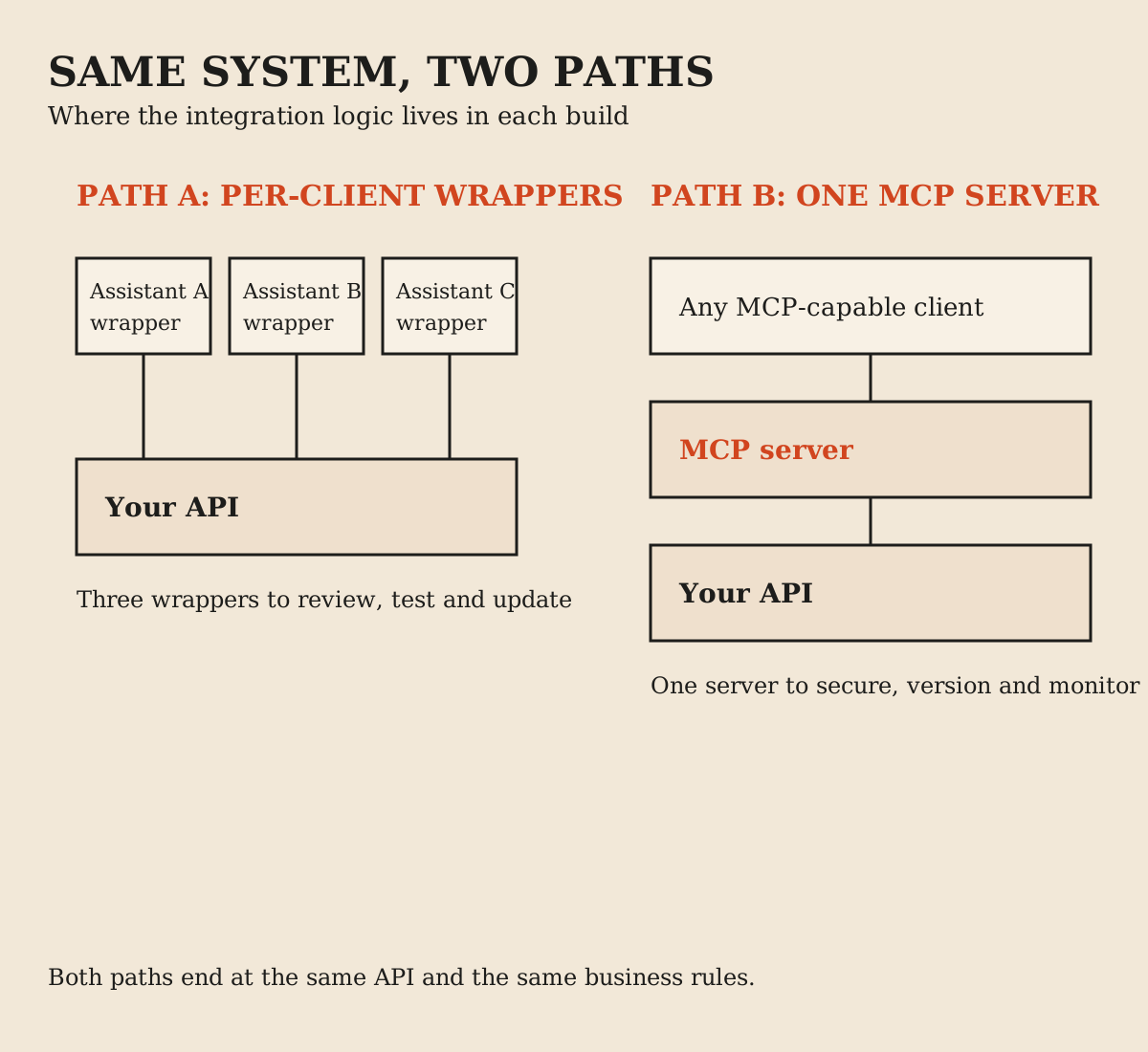
Both builds end at the same API. The difference is where the integration logic lives: in per-assistant wrapper code, or in one server that speaks a shared protocol. Neither build excuses you from the billing system's rules, and neither one makes a refund safe without an approval step.
Is MCP just an API wrapper?
No, though an MCP server often wraps an API. The wrapper part is ordinary: someone still maps tools to underlying operations. What the protocol adds is the standardized surface around that mapping: discovery, typed schemas, optional change notifications and a defined authorization profile[1][3][4].
A plain wrapper is private plumbing between your code and one service. An MCP server is plumbing any compatible client can attach to. That difference matters when more than one AI application needs the same capability, and it matters much less when exactly one internal service calls exactly one other service.
The honest version of the criticism is that MCP does not remove integration work. It moves the work from per-client wrappers into a server you now operate, secure and version like any other production component. Teams that budget for the protocol but not for operating the server tend to rediscover this during the first incident.
There is also a granularity difference worth respecting. A good wrapper exposes exactly what one application needs. A good MCP server exposes what any reasonable client might need, which is a wider surface that more people will probe. Wider surfaces need better fences, which is why the security section below is the longest one in this guide.
Does MCP replace REST?
No. REST remains how services expose operations to other software. MCP is how an AI application exposes and consumes capabilities while a model participates in the call. A remote MCP server is itself typically an HTTP service, and many MCP servers call REST APIs downstream[2].
Replacing REST would only make sense if models were the only consumers of your service. They are not. Your mobile app, your frontend, your partners and your cron jobs all want the boring, explicit contract. MCP serves the additional consumer that reasons at runtime.
Plan for both: the API as the system of record, and an MCP server as one presentation of selected capabilities to AI clients.
Authentication and authorization boundaries
Authorization is optional in the MCP specification. When it is used over HTTP transports, the profile is OAuth 2.1: the MCP server acts as a resource server, the client acts on behalf of a resource owner, and an authorization server issues tokens[4]. Servers must publish Protected Resource Metadata so clients can discover the right authorization server[4]. Local stdio servers should not use this flow at all and instead read credentials from the environment[4].
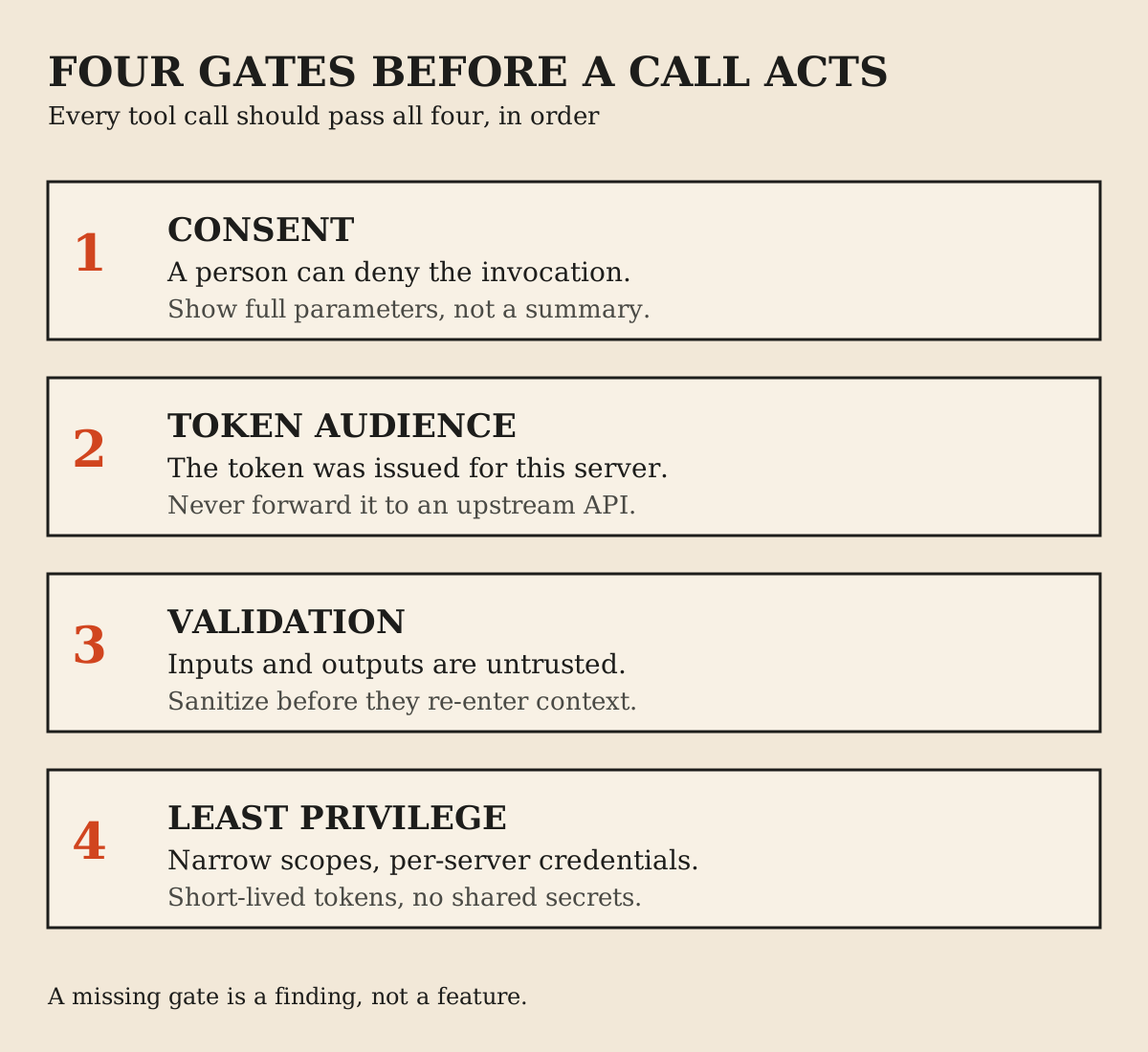
Two boundaries deserve explicit attention. First, the user-to-agent boundary: the model invoking a tool is not the user consenting to the action. The specification expects explicit user consent before tool invocation, and the OWASP guidance warns against assuming that an available tool implies approval for a particular call[3][6].
Second, the agent-to-API boundary. A token issued for your MCP server is not a token for your downstream API. Passing an MCP access token through to an upstream API is a named anti-pattern: token passthrough skips the audience validation that proves the token was meant for this server at all[5]. If the server needs to call downstream, it needs its own credential with its own scope.
What changes when a model chooses the calls
With a plain API, a developer chose every call. With MCP, the model chooses which tool to invoke, when, and with what arguments, and that single shift creates a new attack surface[6]. The OWASP MCP cheat sheet names the main risks.
Tool poisoning hides malicious instructions in tool descriptions, schemas or return values. Rug pulls change a server's tool definitions after the user approved them. Tool shadowing lets one malicious server manipulate how the agent uses another server's tools. The confused deputy problem appears when a server executes actions with its own broad privileges rather than the requesting user's. Data exfiltration can ride legitimate channels, with injected instructions encoding sensitive data into ordinary-looking tool calls. Over-scoped tokens, supply-chain attacks on server packages, message replay and sandbox escapes round out the list[6].
The security best practices specification adds two protocol-level attacks worth knowing by name. A confused-deputy attack on an OAuth proxy can skip user consent using a stolen authorization flow, which is why proxy servers must implement per-client consent[5]. And token passthrough, described above, fails twice: the server never validated the token's audience, and the downstream API receives a credential that was never issued for it[5].
None of these risks are hypothetical decorations on a spec page. They follow directly from giving a language model the power to pick actions against real systems.
A security checklist before you expose a tool
- Grant each server the minimum permissions it needs, with narrow OAuth scopes and short-lived, per-server credentials[6].
- Inspect tool descriptions and schemas before approval, pin reviewed definitions by hash, and re-review when they change[6].
- Validate every input as untrusted, and sanitize tool outputs before they re-enter model context; an output is often another tool's input[6].
- Sandbox local servers, restrict file-system and network access, and separate sensitive servers from general-purpose ones[6].
- Require explicit confirmation for destructive, financial or data-sharing operations, showing full parameters rather than a friendly summary[6][3].
- Validate token audience on every protected request and never pass an MCP token to an upstream API[6][5].
- Use TLS for remote connections, bind local HTTP servers to localhost, and validate Origin and Host headers[6].
- Install servers only from verified sources, check package names against typosquats, and monitor for definition changes after installation[6].
- Log every invocation with parameters, user context and timestamps, redact secrets, and alert on unusual patterns[6].
This list is a starting framework, not a certification. The OWASP cheat sheet and the specification's security page are the sources to work from, and both will keep evolving[6][5].
When a plain API is the better choice
Choose the API alone when no model picks the calls. Server-to-server integrations, scheduled jobs, fixed workflows and partner contracts all belong in explicit code with explicit credentials.
Choose it when the call pattern is tiny and stable. If your assistant needs exactly two operations forever, two reviewed wrappers beat operating a new server. Choose it when latency budgets are tight and an extra hop is a real cost, and when your compliance posture requires that every integration pass a review your MCP server has not yet gone through.
Choose it when the integration must survive contact with a strict change-management process. Some organizations can review a wrapper diff in an afternoon but need a full vendor-style assessment for a new network-facing server. That is a legitimate constraint, not a failure of imagination.
Also choose it, for now, when the team cannot staff the security work from the checklist above. An MCP server you cannot monitor is worse than a wrapper you can.
When MCP earns its place
MCP earns its layer when several AI applications need the same capabilities. One server replaces N per-client wrappers, and discovery removes the redeploy cycle when capabilities change[1][3].
It earns its place when the task genuinely needs runtime selection among many capabilities, the exact situation where a hand-curated allowlist hurts most[7]. And it earns its place when you want the ecosystem: clients your users already have can connect to a compliant server without you building those integrations one by one[1].
It also earns its place as the integration surface you give partners. If outside developers are building agents that should reach your product, a documented MCP server is a more stable public contract than asking each of them to wrap your REST API correctly.
The emerging vendor-endorsed pattern is hybrid: start from your existing API spec, aggressively curate the toolset so the model is not overwhelmed, and expose task-shaped capabilities rather than raw endpoints[7]. That advice comes from a company selling the surrounding identity tooling, but the underlying discipline - few, well-shaped, well-guarded tools - is consistent with the security guidance.
A decision checklist
- Who picks the next call: your code, or a model? Code means API; a model opens the MCP question.
- How many AI clients will need this capability? One favors wrappers; several favor a server.
- How many capabilities, and how often do they change? Many and changing favors discovery.
- What is the worst tool a model could invoke, and which gate stops it? Name the gate before shipping.
- Where do tokens live, and can any token reach further than its audience? Check both directions.
- Who reviews tool definitions now, and who notices when they change later?
- Can you log, alert and roll back at the tool level, not just the HTTP level?
- Does the team have the capacity to operate one more production component securely?
If answers four through eight are weak, the honest decision is a plain API integration until they are strong. MCP will still be there.
FAQ
Is MCP just an API wrapper?
No. An MCP server often wraps an API, but the protocol adds standardized discovery, typed tool schemas, optional change notifications and an OAuth 2.1 authorization profile. A plain wrapper is private plumbing for one client; a server is plumbing any compatible client can use.
Does MCP replace REST?
No. REST remains how services expose operations to software. MCP serves the additional case where a model selects calls at runtime, and many MCP servers call REST APIs downstream.
What is the main difference between MCP and an API?
The consumer. An API is a contract for code a developer wrote. MCP is a protocol for an AI application whose model discovers and invokes capabilities while working on a task.
Is an MCP server safe to expose?
It can be, with work. Least-privilege scopes, explicit consent, input and output validation, token-audience checks, sandboxing, supply-chain review and logging are the documented baseline. An unmonitored server with broad tokens is not safe, whatever the protocol.
What is token passthrough?
An anti-pattern where an MCP server accepts a client token without validating it was issued for that server and forwards it to a downstream API. The token's audience was never checked, and the downstream service receives a credential meant for something else.
Can an agent just call my API directly?
Yes, through wrapper functions you write and maintain. That works well for small, stable capability sets. The cost shows up as the capability count grows, changes often, or needs to reach several AI clients.
Does using MCP mean my agent can do anything the server offers?
Only what you expose, and only after the consent and authorization gates you enforce. The specification expects a human able to deny tool invocations, and the tool list a client sees can vary with the authorization presented.
Is MCP only for local tools?
No. Local servers typically use stdio and serve one client; remote servers use Streamable HTTP and serve many. The older HTTP plus SSE transport is deprecated.
Do I need OAuth for every MCP server?
No. Authorization is optional in the specification, and local stdio servers use environment credentials instead. Remote servers exposing non-public tools or data should require authentication.
Sources
- What is the Model Context Protocol? (opens in a new tab)
- MCP architecture overview (opens in a new tab)
- MCP specification: Tools (opens in a new tab)
- MCP specification: Authorization (opens in a new tab)
- MCP specification: Security Best Practices (opens in a new tab)
- OWASP: MCP Security Cheat Sheet (opens in a new tab)
- Auth0: Why Can't I Just Use an API? Because Your AI Agent Needs MCP (opens in a new tab)
Elsewhere on this site
The AI agents vs workflows guide covers when an agent should choose steps at all. The selected work catalogue covers the products behind these engineering notes.