Claude Code vs Cursor for Data Science: A Workflow Guide
- AI Coding Tools
- Guides
- Claude Code
- Cursor
- Data science
- Written by
- Bhargav Tibadiya
- Published
- Reading time
- 10 min read
For data science, I would start with Cursor if most of the day is spent reading notebook cells, changing a chart and inspecting outputs. Its current data-science guide documents integrated cell execution, notebook support and AI assistance inside the editor[1]. I would evaluate Claude Code for bounded repository tasks such as extracting preprocessing into a package and running a test suite. Its documented tools include shell commands, file editing and NotebookEdit for Jupyter cells[2].
That is a workflow recommendation, not a finding that one assistant writes better pandas code. I have not run a head-to-head test of the two products. The feature and policy facts below were checked against official documentation on November 7, 2026. The evaluation tasks are proposed exercises, not reported results.
The choice is not simply editor versus terminal
Claude Code has a VS Code extension that also supports Cursor. The extension provides an editor-based conversation and review experience, so using Claude Code does not require abandoning a visual editor[3]. A team can keep the same repository open in Cursor while evaluating Claude Code on a specific task.
Cursor is not limited to autocomplete. Its Agent can edit files, search a repository and execute terminal commands[4]. A claim that Cursor cannot handle multi-file work while Claude Code can is therefore too broad. Both have documented ways to act on a project. The useful question is how you want to inspect, steer and accept that work.
For an analyst, the answer might be one notebook cell at a time. For an ML engineer, it might be a proposed change across a package, tests and a training entry point. Neither preference proves which model will produce a correct result on your data.
Jupyter notebooks: where Cursor fits
Cursor's guide says to install the Jupyter extension published by ms-toolsai for full notebook support. It supports `.ipynb` and `.py` files with integrated cell execution, and both Tab and Agent work in notebooks[1].
That is a useful documented fit for exploratory analysis. You can keep the sequence of code, explanatory text and visual output in one workspace rather than treating the notebook as a bag of unrelated source files. The same guide covers pandas, NumPy, scikit-learn, SQL workflows and plotting libraries, but those are supported workflows, not evidence that generated analyses are statistically correct[1].
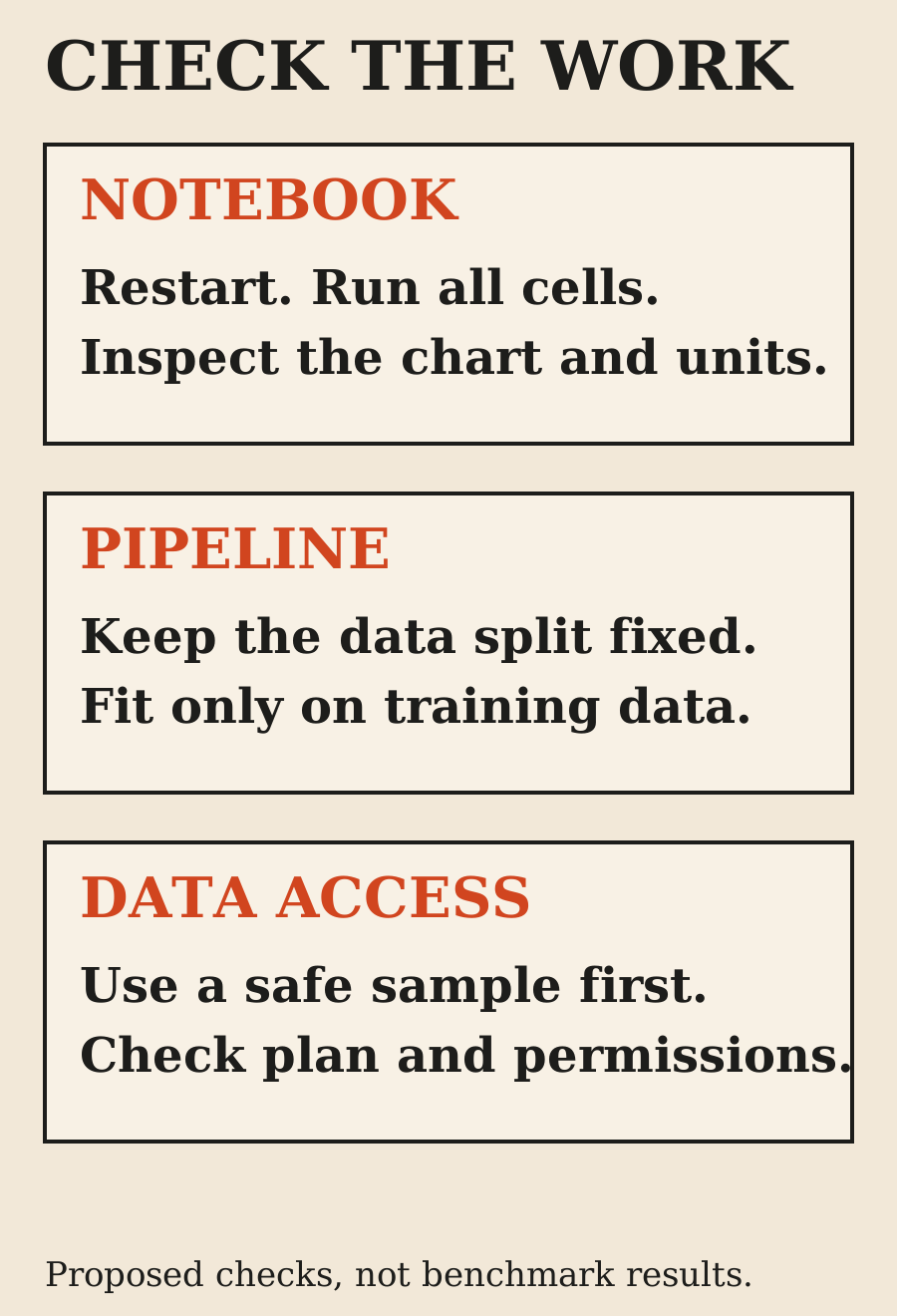
My suggested first task is deliberately small: ask for one transformation and one chart, inspect the code diff, then rerun the affected cells. For example, ask for weekly order totals with an explicit timezone, a stated missing-value rule and an explanation of which rows were excluded. Do not begin with an open-ended request to find every insight in a private dataset.
The acceptance check is whether another person can understand and rerun the result. Does the chart label its units? Are date boundaries explicit? Did the assistant count orders or rows? A polished graph is not enough if the denominator changed without explanation.
Claude Code can work with notebooks too
Claude Code's tools reference documents NotebookEdit for changing Jupyter cells and Bash for executing shell commands[2]. This matters because a comparison that treats notebook support as exclusive to Cursor starts from the wrong premise.
The presence of a notebook-editing tool does not establish that both interfaces have identical cell selection, output inspection or review behavior. It only establishes the documented capability. I would test the interaction on a copy of a real notebook before changing a team's workflow.
A good exercise is to take a notebook that runs only because some cells were executed out of order. Ask the assistant to identify hidden dependencies and propose a clean execution order. Keep an untouched copy, restart the kernel and run from the top. Record what failed and what needed human correction. That tests a data-science problem instead of rewarding whichever tool writes the longest explanation.
Repository work: compare the same deliverable
For a notebook-to-package task, give both products the same boundary: extract feature preparation into a module, add tests and preserve a thin notebook for exploration. Both products document file-editing and command-execution capabilities[2][4], so neither gets an automatic win before the task starts.
I would require these deliverables:
- A function with explicit inputs, outputs and missing-value behavior.
- Tests for an empty input, duplicated records and an unexpected category.
- A command that runs the checks from a clean checkout.
- A short explanation of behavior that intentionally changed.
Ask for a plan before allowing broad edits. Review the first extracted function before the assistant changes every notebook. If it misunderstands the target column or time boundary, stopping early is better than reviewing a large, internally consistent mistake later.
This is where I would personally trial a repository-oriented Claude Code session, while keeping Cursor open for inspection. That is a proposed workflow, not a claim that Claude Code finishes the task faster. Cursor Agent can attempt the same deliverable and should be judged against the same checks.
Data leakage matters more than a clean-looking diff
A coding assistant can produce valid Python and still produce an invalid experiment. Scikit-learn's common-pitfalls guide warns that test data must not be used to make model choices or to learn preprocessing parameters. It recommends splitting the data before fitting transformations and using pipelines to reduce leakage risks[5].
Use that as an acceptance criterion for either assistant. If a proposed cleanup fits a scaler on the entire dataset before the split, the code can run successfully while making the evaluation misleading. A passing notebook is not proof of a valid experiment.
For a fair exercise, write the train/test boundary into the task. Ask the assistant to explain where fitting occurs, what reaches the test set and which steps are reused at prediction time. Then inspect the implementation yourself. Do not award a point for using a Pipeline class if an earlier feature-selection step already saw all the data.
I would also keep the split policy fixed during the comparison. If one assistant changes a time-based split to a random split, its score is no longer answering the same question. Documented library guidance supplies the correctness rule; the assistant's confidence does not.
Debugging: distinguish environment failures from reasoning failures
Cursor documents an integrated debugger for Python pipelines, development containers and remote SSH workflows in its data-science guide[1]. Claude Code documents command execution and editor integration[2][3]. Those are ways to work with an environment, not a promise that either product provisions the right interpreter or GPU for you.
Before comparing results, record the Python version, environment definition, dataset snapshot and the exact command used to run the task. Give each assistant the same environment. Otherwise a missing package in one setup can masquerade as a model-quality difference.
A useful debugging task starts with a reproducible failure: a failing assertion, a stack trace and the expected behavior. Ask for the smallest fix. Check whether it changes business logic to make a test pass, or whether it actually fixes the defect. Keep the failing test in the repository so the next change cannot quietly reintroduce it.
For large data, start with a small representative sample and a schema. An assistant does not need unrestricted access to a production warehouse to explain a Python traceback. Expand access only when the specific task requires it and your organization's rules allow it.
Privacy: a local editor does not mean local-only AI
Cursor says Privacy Mode is available to free and paid users and that, when enabled, it will not train on your data. Its security page also describes contractual and technical controls with model providers[6]. That is a policy about data use, not a statement that all inference happens on your laptop.
Anthropic's Claude Code documentation separates consumer and commercial policies. Consumer accounts can choose whether their data is used for model improvement. Under commercial terms, code and prompts are not used to train generative models unless the customer opts into a program that permits it[7].
The same documentation says local Claude Code sends data over the network to interact with the model and stores session transcripts locally. Retention depends on account type and settings[7]. Running a command in a local terminal is not evidence that private data stays entirely on the machine.
For either product, decide what data the assistant may read before you connect it. Use synthetic or redacted samples for a first evaluation. Keep database credentials out of notebooks and prompts. If the task only needs a schema and a few representative rows, do not hand over the full table by default.
For regulated or contract-restricted data, check the specific plan, processing terms and organization settings. Neither the word "local" nor a privacy toggle is a substitute for that review. This guide is not a compliance determination for your dataset.
Pricing: compare the same model and billing path
Cursor's current pricing page is not the older "$20 Pro" menu still repeated in many comparison posts. On November 7, it lists Plus at $8, Premium at $30, Super at $100 and Ultra at $200 per month. Plus is limited to Grok models; the page says third-party model usage in Cursor is purchased separately and is not included in those monthly prices[8].
That distinction matters if your intended comparison uses Claude inside Cursor. Do not compare the cheapest Grok-only tier with a Claude Code subscription and call it the same model for less money. Verify the selected model and the additional usage charges in your own account.
Anthropic's current individual plans list Pro at $20 monthly, Max at $100 and Ultra at $200; Pro also has an annual option. Claude Code is included in paid plans, with usage shared across Claude surfaces and limits that depend on the plan[9]. This is not unlimited compute or a fixed number of notebook tasks.
I would compare total spend for the actual workflow: subscriptions, separately billed model use and any compute or database charges outside the assistant. A notebook executing on a paid remote machine has costs beyond the coding product. Keep a week of actual usage before estimating a recurring team budget.
The separate Claude Code cost guide covers usage credits, API billing and the limits of illustrative session-cost arithmetic. Here, the important point is to avoid treating unequal billing paths as an apples-to-apples benchmark.
A fair evaluation you can run on your own project
Use a disposable branch and a dataset your team is allowed to share. Give both products the same task description and acceptance checks. Name the model, product version, plan, date and starting repository commit. Do not silently give one assistant more context or extra attempts.
I would use three tasks:
- Notebook task: fix one transformation, regenerate a chart and rerun from a clean kernel.
- Pipeline task: extract a tested preprocessing function without changing the train/test boundary.
- Debugging task: fix a reproducible failure without weakening the existing assertion.
Record successful outputs, wrong assumptions, human edits and money spent. If time matters, define where timing begins and ends, including review and repair. If one tool finishes quickly but requires substantial correction, report both facts rather than declaring a winner from generation speed alone.
Keep the results modest. One dataset and one reviewer can tell you which workflow fits that project. They cannot prove a universal winner for all data science, Python or machine learning.
Which should you choose?
Choose Cursor as the first trial when notebook interaction and visible cell-by-cell review dominate your work. Its official guide describes that workflow directly[1].
Evaluate Claude Code when you want to delegate a bounded repository change with explicit tests and review points. Its editing and command tools support that kind of task[2], but you still need to measure whether it performs well on your project.
Use both only when each has a clear job. A reasonable arrangement is an editor for exploration and review, plus an agent session for an isolated package change. Having two assistants rewrite the same files at once is not an evaluation plan.
My recommendation is to pick the next real task, not an overall brand winner. Keep the data boundary narrow, define correctness before prompting and count human repair work as part of the result.
What this comparison does not establish
I did not run either assistant, benchmark generated models, measure completion time or verify performance on a private dataset. The tasks above are a proposed evaluation method. Product capabilities, pricing and policies come from the cited official pages checked November 7, 2026. They can change, and account-specific availability can differ.
FAQ
Is Cursor better than Claude Code for data science?
Cursor is a sensible first trial for notebook-centered interaction. Claude Code is worth evaluating for bounded repository work. This guide does not contain test results proving one produces more accurate analyses.
Can Claude Code edit Jupyter notebooks?
Yes. Its documented NotebookEdit capability modifies Jupyter cells. That does not mean its notebook interface is identical to Cursor's.
Can Cursor Agent run Python commands?
Cursor Agent documents terminal-command execution. You still need the right Python environment, dependencies and permission to run the code.
Do I need both tools?
No. Start with one task and one tool. Add a second only if it solves a clear workflow problem and its additional cost makes sense.
Does Privacy Mode mean my dataset stays on my laptop?
Do not assume that. Training policy, retention and processing location are different questions. Check the product's current terms and the exact plan before using sensitive data.
What should I measure in a comparison?
Correctness, reproducibility, human correction, review effort and total cost. Keep the dataset, task and acceptance checks consistent.
Sources
- Data Science - Cursor (opens in a new tab)
- Tools reference - Claude Code (opens in a new tab)
- Use Claude Code in VS Code - Claude Code (opens in a new tab)
- Cursor Agent - Cursor (opens in a new tab)
- Common pitfalls and recommended practices - scikit-learn (opens in a new tab)
- Security and Privacy Mode - Cursor (opens in a new tab)
- Data usage - Claude Code (opens in a new tab)
- Pricing - Cursor (opens in a new tab)
- Plans and pricing - Claude (opens in a new tab)
Elsewhere on this site
Read does Cursor train on your code? for a closer look at privacy settings, or the Claude Code cost guide before setting a usage budget.