Cursor vs Claude Code for Mobile App Development
- AI Coding Tools
- Comparisons
- Cursor
- Claude Code
- Mobile development
- Written by
- Bhargav Tibadiya
- Published
- Reading time
- 9 min read
For mobile app development, I would choose Cursor when the work is centered on an editor and repository workflow, and consider Claude Code Desktop when its documented local iOS Simulator workflow matches an available Mac. I would not choose either by assuming that a successful code edit means the app ran on a device.
Cursor Cloud Agents work in isolated virtual machines rather than on your laptop[1]. Claude Code Desktop has a documented iOS Simulator pane, but that feature is a public beta for local sessions on macOS, not cloud or SSH sessions[2]. Those execution boundaries matter more than a generic claim that one assistant is better at mobile code.
This is a documentation-based comparison checked November 9, 2026. I did not build the same app with both tools, time either agent, or measure code quality. The recommendations below are workflow judgments, not benchmark results.
Start with the app and the machine
Write down the framework, target platform and runtime before opening an agent. A Swift app on a Mac, an Android project with a configured emulator and an Expo app with a development build are different starting points.
Then separate the work into editing, building, running and checking behavior. An agent might have access to the repository but not the simulator, signing setup, backend account or physical device needed for the next step. A useful task tells it which of those capabilities are available and asks it to stop at an honest boundary when one is missing.
For an existing team, the best default is often the tool already connected to the project's working environment. Switching assistants does not repair a missing SDK, broken build script or unavailable test account.
What Cursor's cloud workflow changes
Cursor documents Cloud Agents as separate virtual machines with cloned repositories, dependencies, secrets and startup configuration. They can work independently of your laptop's internet connection and return screenshots, videos and logs as artifacts[1].
That is useful for parallel repository tasks, but the environment must be configured to do the work. Cursor explicitly says that an agent unable to run tests or reach required services cannot close the loop on its changes[1].
Do not treat a cloud branch as if it inherited the local emulator you already booted. Name the environment and device route in the task. If the agent only ran unit tests, the handoff should say unit tests, not mobile UI verified.
What Claude Code's iOS pane adds
Claude Code Desktop's iOS Simulator pane streams a simulated device beside the conversation. The documented workflow can build, install, launch and check an app, while also letting you interact with the simulator yourself[2].
The requirements are specific: a Mac, Xcode with the iOS platform installed and a supported Claude plan. The documentation recommends Xcode 26.x or Xcode 27. It excludes Enterprise organizations with a HIPAA configuration from the beta[2].
This is a concrete reason to consider that workflow for local iOS development. It is not evidence of better generated Swift, fewer bugs or faster delivery. Those would require a controlled comparison that I have not performed.
Local sessions and remote sessions are different
The iOS pane is available in local sessions only. Claude's documentation says cloud and SSH sessions cannot reach the simulators on your Mac[2].
That boundary prevents a common mistake: asking a remote session to test the app in a device that exists only on your workstation. The task may still be able to edit the repository and produce a patch. It should not claim that it drove the local simulator unless there is an actual supported connection and evidence.
For either tool, include the execution location in the result. A short line such as local Mac, named simulator, specified build is more useful than a confident but location-free statement that testing passed.
Android still needs a device route
A shared mobile automation layer can matter more than the editor. Expo documents Callstack's agent-device CLI as usable from Cursor, Claude Code, Codex and other coding agents. It supports inspecting and interacting with Android Emulators and iOS Simulators, among other targets[3].
Its local Android setup requires Android SDK Platform Tools with adb on PATH. Local iOS use requires macOS and Xcode. Device clouds or remote device hosts can avoid those local toolchains, but they introduce their own access and setup requirements[3].
This is not a built-in victory for one assistant. If both can use the same configured device tooling, compare the quality of their task plan, changes and evidence rather than counting access to that shared tool as an exclusive feature.
Expo device automation is not just code inspection
The agent-device documentation distinguishes reading code from operating the installed app. It can inspect accessibility state, tap, type, scroll, capture screenshots and collect diagnostics[3].
That gives a mobile task a stronger acceptance target. Instead of asking whether a screen looks correct in source, ask the agent to open it, reproduce the original problem and show the changed behavior in the running app. Keep the request scoped to the available device and account.
The documentation says the CLI operates an installed app and does not require adding an agent-device library to the Expo project[3]. Do not add a production dependency merely because an external testing workflow exists. Check the project's actual requirements first.
Remote iOS access is not automatically available
Expo Simulators documents remote iOS Simulators and Android Emulators that agents can control. Its guide describes cloud coding environments as one use case[4].
The important qualification is access: the page calls it a limited-access preview for select partners and says it is not included with paid or free plans. A normal Expo subscription does not establish that a team can use it today[4].
That makes it an option to verify, not a default promise in a Cursor-versus-Claude comparison. Before planning a cloud-only mobile workflow, confirm the remote device service is actually available to the account and project. Otherwise prepare a local-device handoff rather than inventing a working connection.
Coding from a phone is not building for a phone
Claude's iOS and Android app can start, monitor and steer Code sessions. The phone app is a client, not the place where code executes. Cloud sessions run remotely; Remote Control and Dispatch use a computer that must remain available[5].
Cursor likewise documents mobile access to Cloud Agents through its iOS app and web, with an Android browser/PWA route[1]. That is about controlling development, not proof that the mobile app being developed has been installed or tested.
Keep the two questions separate: can I manage this coding task from my phone, and can this task run my app on a suitable test device? A positive answer to one does not settle the other.
Xcode permissions are another boundary
Apple documents a separate route for external agents to access Xcode tools through MCP. The user enables external-agent access in Xcode's Intelligence settings and configures the agent, with the project open in Xcode[6].
This can make local tooling available, but the connection itself does not prove a build succeeded. Ask the agent to name the project, scheme, destination and check it ran. Review any proposed changes to signing, capabilities, build phases or entitlements instead of treating them as incidental setup.
Apple's external-agent documentation and Claude's simulator pane describe related but different layers. Do not collapse plugin discovery, Xcode tool access and a streamed simulator into one feature with one assumed requirement.
For Expo, compare the same context
Expo's MCP documentation describes tools that provide project and service context, including help with dependencies and build investigations[7]. That context can change what an assistant is able to diagnose.
A fair comparison gives both agents the same project revision, reproduction steps, available service access and acceptance test. Otherwise an agent with a connected build history may appear more capable than one asked to reason from a pasted error alone.
Keep service access narrow. Use test accounts and non-production credentials where possible. If the agent cannot access a build artifact or backend response, make that missing evidence visible rather than accepting a guessed explanation.
A practical task for either assistant
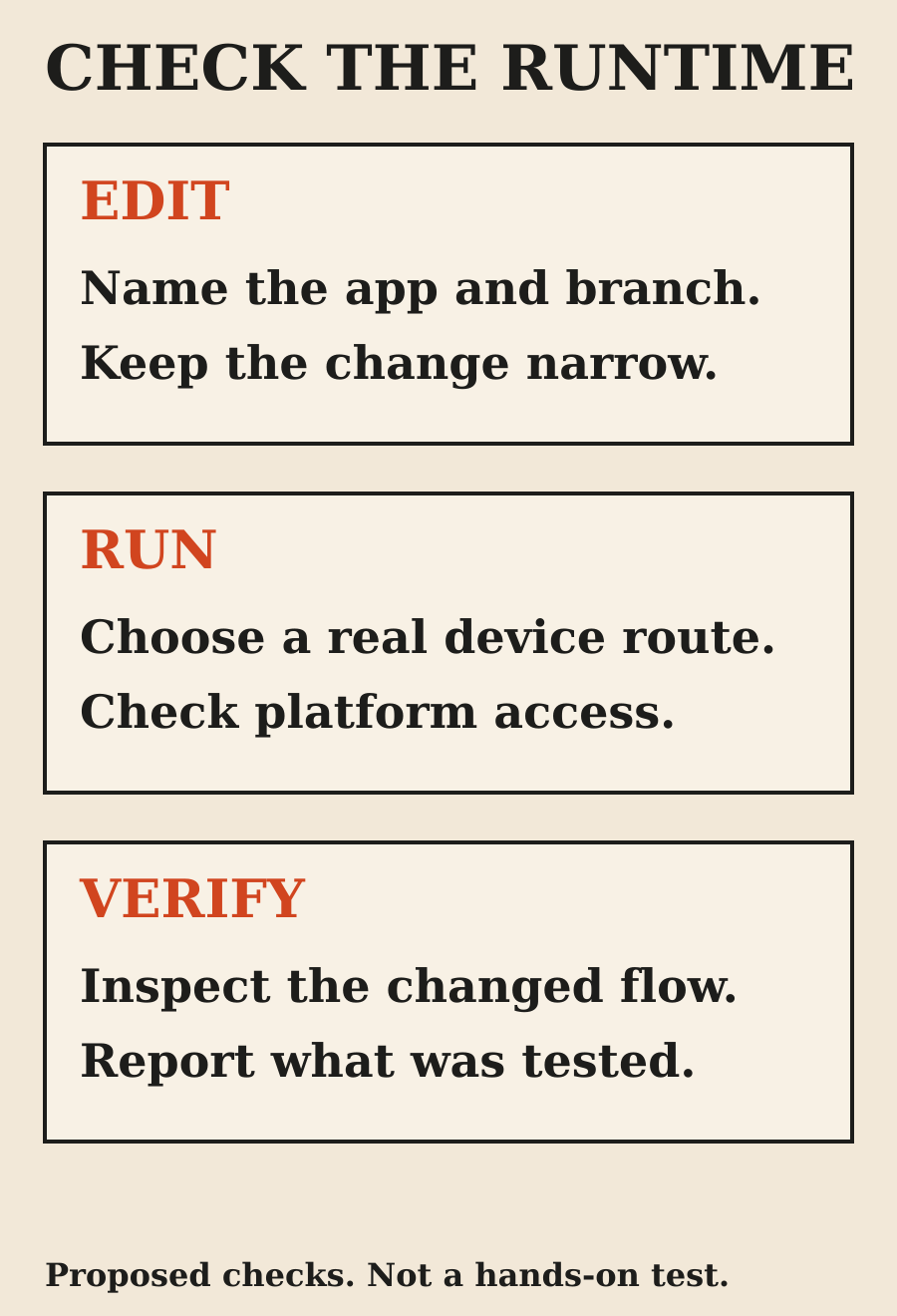
I would start with one reproducible defect: a save button stays enabled when a form is invalid, a navigation transition loses state, or an empty list has no useful message. Specify the platform and the device you can use.
Ask for the smallest fix, a relevant automated check and a recording or screenshots of the changed interaction. Include the error state, loading state and a return navigation, not only the happy path. These are proposed acceptance checks, not tests I ran for this article.
A useful handoff separates what passed from what remains: code changed, named test passed, app built for a stated destination, interaction checked on a named simulator, physical device not checked. That makes the next person's work clear.
Signing and release deserve their own review
Neither a good patch nor a simulator demonstration settles a store release. Review signing configuration, permissions, environment selection and release artifacts separately. A visual check on one simulated device is not a claim about every phone or operating-system version.
Avoid giving an agent a broad instruction to fix everything until the release works. That can mix a small UI change with dependency upgrades and signing changes, making the review harder. Keep an unexpected release blocker as a separate finding with its own proposed fix.
If the available environment cannot finish a check, stop at a reviewable patch and an exact reproduction. A narrow truthful result is better than a broad unverified completion claim.
Which would I choose?
For local iOS work on an eligible Mac setup, Claude Code Desktop's documented simulator pane is a useful feature to evaluate. For repository work organized around Cursor, its agent workflow may be the more convenient place to stay, with explicit device tooling added where needed.
For Android or Expo, I would first establish a reliable build-and-device loop and then compare the assistants inside that same loop. Shared device tools and service integrations reduce the value of a simplistic winner label.
My deciding question is whether the workflow can produce reviewable device evidence for the change I need. Choose the assistant that fits that environment and review process. Recheck current plan access and preview limits before paying for a feature assumed from a comparison article.
FAQ
Is Cursor or Claude Code better for mobile development?
There is no measured winner in this article. Choose around your framework, toolchain, device access and review workflow. Compare both on the same bounded task if generated-code quality is your deciding factor.
Can Claude Code test an iOS app?
Claude Code Desktop documents a local macOS iOS Simulator pane in public beta, with plan and configuration requirements. That does not mean every Claude session can reach a simulator or physical iPhone.
Can a Cursor cloud agent use my local simulator automatically?
Do not assume that connection. Cloud Agents run in their own environments. Establish a supported device route and verify it before asking for device-level results.
Does an Expo plan include remote simulators?
The checked Expo Simulators page describes a limited-access partner preview, not a feature included by default in paid or free plans. Confirm access before depending on it.
Can I control development from an Android phone?
Both products document ways to manage sessions from mobile surfaces. Managing a coding session from a phone is separate from compiling and testing the app under development.
Did you benchmark the two assistants?
No. This guide compares documented workflows and requirements. It includes no measured speed, cost or success-rate result.
Sources
- Cursor Cloud Agents (opens in a new tab)
- Claude Code Desktop: Test iOS apps in the simulator (opens in a new tab)
- Expo: agent-device and Expo (opens in a new tab)
- Expo Simulators introduction (opens in a new tab)
- Claude Code on mobile (opens in a new tab)
- Apple: Giving external agents access to Xcode (opens in a new tab)
- Expo: Using Model Context Protocol (opens in a new tab)
Elsewhere on this site
Cursor vs Claude Code for Frontend explains the browser-facing review loop. Claude Code's Xcode Plugin separates marketplace discovery from local Xcode capability.